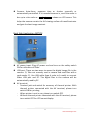
1
LCD monitor and camera LCD monitor: ON/OFF button mainly used. Slider LCD Operating Instructions Button Function Down :Positive and Negative Adjustment Menu :Activation of Menu Indicator UP :Positive and Negative Adjustment POWER:ON / OFF / Mode Selection and Enter button in function menu mode (OFF Press and hold for about 3 seconds to turn off the power) Display Area Power OFF Down button Menu button Up button Power button Press Power ON Mode Selection When monitor is power on, press ” V1 mode ” button to change mode between V1 and V2. The real-time display from digital camera Press Press & Hold 3 sec. V2 mode Adjust Button (the button will work when the monitor is in function menu mode ) is in one of the two channels. Press and hold the ” ” button for 3 seconds, the monitor power will be turned off. Press adjust ( / ) button to adjust the basic function, reset all function, and choose NTSC/PAL mode in V1 or V2 mode. 10 www.maestrogen.com