1
HANDS-ON MICROCONTROLLERS
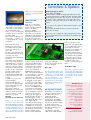
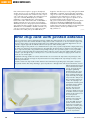
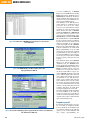
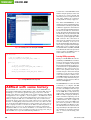
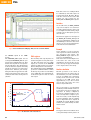
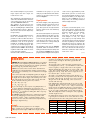
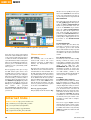
Figure 6. The ‘Terminal’ view of MIFARE Magic shows all the characters sent by the reader
over the USB interface.
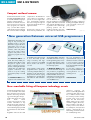
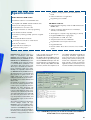
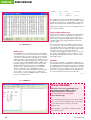
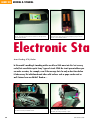
Figure 7. The ‘MIFARE UltraLight’ and ‘Mifare Standard‘ windows allow
simple programming of the RFID card.
to select a COM port, as MIFARE
Magic uses the D2XX driver internally.
Figure 6 shows the ‘Terminal’ view of
MIFARE Magic. This mode emulates a
VT100 terminal and displays all the
characters sent by the LPC microcontroller over the FTDI interface.
The firmware in the LPC microcontroller defaults to ‘terminal’ mode on
power-up. As soon as the reader
detects a new card within its field it
activates the card. The reader determines whether the card is a MIFARE
UltraLight, MIFARE 1K or MIFARE 4K.
The entire memory contents of the
card are read out and displayed on the
MIFARE Magic terminal. For MIFARE
1K and 4K cards the standard MIFARE
key is used. If the card uses a different
key the data stored in certain sectors
will not be readable. To use a different
terminal program instead of MIFARE
Magic (such as HyperTerminal or the
built-in terminal in the LPC Flash
Magic programming tool), the VCP
driver must be used and the terminal
program must be told the number of
the relevant COM port. The parameters for the port are as follows: 115200
baud, no parity, 8 data bits and one
stop bit.
The ‘Window’ menu allows MIFARE
Magic to be switched between the
‘Terminal’ view, the ‘MIFARE UltraLight’ and the ‘Show All Cards’ views.
The ‘MIFARE UltraLight’ window (see
Figure 7) allows various card commands to be executed with a click of
the mouse. This makes it easy to program a MIFARE UltraLight card, such
as the sample supplied free with this
issue. When this window is opened
the firmware in the LPC microcontroller on the reader board switches
from terminal mode into PC reader
mode. Here the microcontroller waits
for a card command from the PC and
calls the corresponding function in its
software. This mode is useful when
developing applications on the PC.
The ‘Show All Cards’ window displays
the serial numbers of all cards currently detected by the reader. This is
useful for testing reader range and the
capacity of the reader to deal with multiple cards simultaneously.
Program-it-yourself
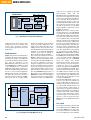
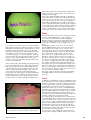
Figure 8. The free PC-based Flash Magic program can program the LPC microcontroller over the USB interface
of the Elektor Electronics RFID reader.
32
For dedicated applications it is possible to modify or completely rewrite
both the firmware in the LPC936 and
the software running on the PC. Any
updates to the reader firmware will
also require reprogramming the
elektor electronics - 9/2006