1
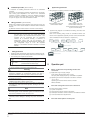
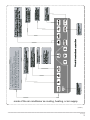
14) ON/OFF key
Any time when you press the key, the centralized
startup/shutdown operation is performed for all current in-service
air conditioners in the centralized controller network. If all
in-service air conditioners in the network are in the power-off
status, press the key to perform the startup operation. If it is in
the mode setting page currently, and the parameters such as
startup mode, temperature and air speed are selected, the air
conditioner will be started according to the selected parameters.
If no mode is selected currently, and the air conditioner is
powered off or it is in other display page currently, and the
default startup mode is: Cooling, strong air, set temperature
24°C, swing function enabled. The default startup mode is
locked according to the system mode or judged according to
other constraint conditions. If any conflict exists, the next
conflict-free mode will apply automatically. If conflict exists for all
modes, startup will be impossible. If one or more in-service air
conditioners in the network (including in the timing process of
timing startup/shutdown), pressing this key will shut down all air
conditioners. When performing the shutdown operation, the
shutdown command is issued to the air conditioners in the startup
status only, and is not issued to those in the shutdown status.
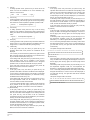
15) Lock key
In the mode setting mode, press the Lock key, and the remote
controller of the currently selected air conditioner will be
locked/unlocked. The operation mode is: If you select
single-machine setting, the operation is performed for the air
conditioner of the current address only. If the remote controller of
the air conditioner is locked currently, issue the lock command;
otherwise, send the lock command. If you does not select the
single-machine mode, and the remote controller of one or more
currently selected air conditioners is locked, issue the unlock
command; if the remote controllers of all currently selected air
conditioners are in the non-locked status, issue the remote
controller lock command.
When the remote controller of the air conditioner is locked, the
air conditioner does not receive remote control signals from the
remote controller or wire controller until the remote controller is
unlocked. Press the Query key and then press the Lock key, and
the keys of the centralized controller will be locked or unlocked.
If the keys are currently locked, press the foregoing keys
concurrently again, and the keys will be unlocked; if the keys are
currently unlocked, press the foregoing keys concurrently, and
the keys will be locked. If the keys are locked, pressing of any
key other than the Unlock key will be ineffective.
In the unified setting page, press the Up key and the Lock key
concurrently to lock all air conditioner modules in the network.
The mode locking is cancelled when the key is pressed again.
Note: When you lock or cancel locking, the corresponding icon
indication appears or disappears only after all the
attached air conditioners are set completely, so it takes a
time period. When the number of attached air
conditioners is high, wait patiently.
16) Confirmation key
In the setting mode, press the key to send the currently selected
mode status and the auxiliary function status to the selected air
conditioner, and display the mode setting operation results.
After you select the operation mode and auxiliary function status
information of the air conditioner, if you do not press the
confirmation key, the selected information will not be sent to the
air conditioner, and will not affect the current operation of the air
conditioner.
The operations of remote controller locking and unlocking need
no pressing of the confirmation key. The command information is
sent directly after the locking key is pressed.
17) Reset key
Anytime when the reset key is pressed, the centralized controller
will reset. The result is the same as the result of restoring
power-on after power failure.
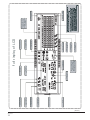
General display data entries
1)
2)
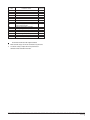
General display data is displayed in all display pages.
a. Under the interconnected control of the computer or
gateway, the data is displayed in graphic. Otherwise, no
data is displayed.
b. If the centralized controller is connected with the functional
module for communication, the data is displayed in graphics.
Otherwise, no data is displayed.
c. If the centralized controller is connected with the SMS
remote control module for communication, the data is
displayed in graphics. Otherwise, no data is displayed.
d. If the centralized controller is connected with the telephone
remote control module for communication, the data is
displayed in graphics. Otherwise, no data is displayed.
e. In normal operation of the centralized controller, the
periodical cycle module communicates with the network
interface module, and the data is displayed dynamically and
cyclically (blank).
f. In the centralized control locked status or the keypad locked
status, the locking flag is displayed. After unlocking, it is not
displayed. In the centralized controller locked status, the
flag blinks at 0.5Hz; in the keypad locked status, the flag is
displayed constantly. If both of them are locked concurrently,
the flag is displayed constantly.
g. In the setting page, if the selected air conditioner is in the
remote controller locked status (in case of non-single
machine operation, as long as one machine is in the remote
controller locked status, it is deemed the locked status), the
flag is displayed constantly.
h. If all indoor units lock the cooling mode, this flag will display;
if all indoor units lock the heating mode, this flag will display.
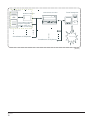
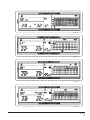
Data display handling
1. Indoor unit code (address) display: Display range: 00~63;
with “#” being luminous concurrently.
2. Indoor temperature display: Display range: 00~99°C. “°C”
and “indoor temperature” are displayed concurrently. If the
temperature is higher than 99°C, “_99°C” is displayed. If the
temperature value is invalid, “—” is displayed.
3. If timing startup/shutdown is set, the flag is displayed.
4. T3, T2A and T2B display: In the single-machine query page,
display can shift between “T3”, “T2A” and “T2B”, and the
temperature value is displayed concurrently, with the
corresponding “°C” being luminous.
5. In case of air conditioner fault or protection, the
corresponding fault code or protection code can be displayed.
I&O manual
5