1
Git Memo Documentation, Release v1.1
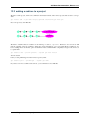
is unreachable from a ref.
Nevertheless HEAD@{25} has been rebased as HEAD~11 and can be reached.
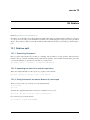
4.2 Finding the sha of a file
Refs: git ls-files(1), git ls-tree(1), git-rev-parse(1), gitrevisions(7), git hash-object(1).
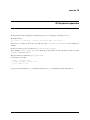
To show the blog sha associated with a file in the index:
$ git ls-files --stage somefile
100644 a8ca07da52ba219e2c76685b7e59b34da435a007 0
somefile
This is not the sha1 sum of the raw content, but you can get it from any file even unknown in your repository with:
$ git hash-object somefile
a8ca07da52ba219e2c76685b7e59b34da435a007
$ cat somefile | git hash-object --stdin
a8ca07da52ba219e2c76685b7e59b34da435a007
The sha is derived from the content, and the size of the file, you can get it from the sha1sum command with:
$ (/usr/bin/stat --printf "blob %s\0" somefile; cat somefile) | \
sha1sum
a8ca07da52ba219e2c76685b7e59b34da435a007
While git ls-file use by default the cached content, by using plumbing commands, you can also look at any object.
To show the blog sha of the object associated with a relative path in the HEAD:
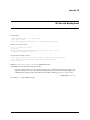
$ git ls-tree HEAD <path>
You can also use path starting from the git worktree directory. If the root of your are in a directory subdir you get
the same result with:
$ git ls-tree HEAD somefile
100644 blob 1a8bedab89a0689886cad63812fca9918d194a98
$ git ls-tree HEAD :somefile
100644 blob 1a8bedab89a0689886cad63812fca9918d194a98
$ git ls-tree HEAD :./somefile
100644 blob 1a8bedab89a0689886cad63812fca9918d194a98
git ls-tree HEAD :/subdir/file #note initial slash
100644 blob 1a8bedab89a0689886cad63812fca9918d194a98
somefile
somefile
somefile
somefile
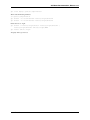
you can also use git rev-parse with:
$ git rev-parse HEAD:subdir/somefile # no leading slash
1a8bedab89a0689886cad63812fca9918d194a98
$ git rev-parse HEAD:./somefile
1a8bedab89a0689886cad63812fca9918d194a98
$ git rev-parse :./somefile # index cached content
a8ca07da52ba219e2c76685b7e59b34da435a007
$ git rev-parse :0:./somefile
a8ca07da52ba219e2c76685b7e59b34da435a007
$ git hash-object somefile # the unregisterd worktree version
67a21c581328157099e8eac97b063cff2fb1a807 somefile
4.3 Finding the top level directory
Ref: git-rev-parse(1)
To show the absolute path of the top-level directory.:
4.2. Finding the sha of a file
17