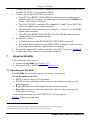
1
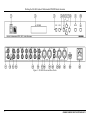
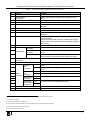
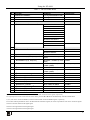
Defining the SG-6006 Genlock Multistandard SPG/SDI/Audio Generator Table 1: SG-6006 Front and Rear Panel Features # 1 2 3 4 5 Feature POWER Switch SETUP / MENU LCD Display MENU Button ENTER Button Button 6 7 8 Button Button Button 9 GENLOCK Button 10 11 PANEL LOCK Button INPUT BNC Connector LOOP BNC REFERENCE Connector TERM Button 12 13 14 15 16 17 18 19 20 21 22 23 24 25 ANALOG VIDEO OUTPUT BNC Connectors SDI OUTPUT BNC Connectors 1+2 AES 75Ω 3 BNC 3+4 Connectors AES/EBU 5 XLR AUDIO OUTPUTS Connectors ANALOG RCA Connectors 1+2 3+4 RIGHT LEFT BALANCED LEFT ANALOG XLR RIGHT Connectors RS-232 9-pin D-sub Port Power Connector with Fuse Function Illuminated switch for turning the unit ON or OFF Displays user interface messages and configuration menu items Press to open the menu (see Section 7.1) Press to load and save a set up, and enter the submenus Press to decrease numerical values or select from several definitions Press to move down the menu list Press to move up the menu list Press to increase numerical values or select from several definitions Press to toggle between a genlocked generator and a freerunning generator 1 When lit, the machine will “genlock” to a valid reference input. When not lit, the timing of the generator is internally generated (free-running) Press and hold 2 to lock/unlock the front panel buttons Connect a reference input for genlocking the machine Connect to an additional machine to loop the genlocking source When looping, release the TERM button When not looping, terminate the line by pressing the button Connect to the composite video acceptors (from 1 to 8) Connect to the SDI acceptors (from 1 to 4) Connect to an AES-3id digital audio acceptor (for channels 1 and 2) 4 Connect to an AES-3id digital audio acceptor (for channels 3 and 4)4 Connect to an digital audio acceptor (for channels 1 and 2)4 Connect to an digital audio acceptor (for channels 3 and 4)4 Connect to an analog audio acceptor Connect to a balanced analog audio acceptor Connects to the PC or the Remote Controller 6 AC connector enabling power supply to the unit 1 If a reference input is not connected, the GENLOCK button blinks when pressed 2 For about 3 seconds 3 Known in the industry as AES-3id 4 In accordance with the standard, the audio digital stream contains 2 audio channels 5 Known in the industry as AES3 Type I 6 Via a null-modem connection 5