1
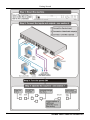
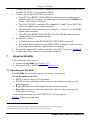
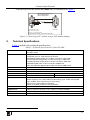
Connecting the SG-6006 6 Connecting the SG-6006 Figure 2: Connecting the SG-6006 Genlock Multistandard SPG/SDI/Audio Generator To connect 1 the SG-6006 Genlock Multistandard SPG/SDI/Audio Generator, as illustrated in the example in Figure 2: 1. Connect the VIDEO OUTPUT BNC connectors to up to eight composite video acceptors 2, for example: OUTPUT 1 to a non linear editor OUTPUT 6 to a studio camera OUTPUT 8 to an input on the Kramer VS-808xl 8x8 Video / Audio Matrix Switcher 1 Switch OFF the power on each device before connecting it to your SG-6006. After connecting your SG-6006, switch on its power and then switch on the power on each device 2 You do not have to connect all the outputs 7