1
Step
1
Register Your Serial Number
1
2
3
4
You must have an account on uvi.net/ and ilok.com/ prior to registration
If you purchased a physical version of this product, your serial number is located on the inside of the box
If you purchased an electronic version of this product, your serial number will be included in a confirmation email
You can see a list of the products you’ve registered and their serial numbers anytime at uvi.net/my-products
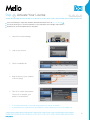
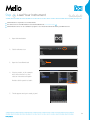
1. Login to your account on uvi.net/
2. Navigate to the ‘Product Registration’ page
3. Enter your details and click ‘Register’
Upon completion a new license will be
deposited in your iLok account
6