1
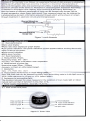
5.2 Battery
installatio,n
i':
ffi%J
Fqur
-l.banery installaricn
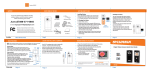
A. Refer to Figure 3 and insert orie buttony battery
in the battery box.
B. Replace the cover.
profrly
according to the polarity sign
Apl"ur" take care of the polanty when you insert the battery for the improper insertion
may damage the device.
5.3 Accessories
A. One rechargeable buttony battery
B. Charge accessories: One power adapteri
C. One user manual
D. One lanyard
one charger, one data line
6.1 Application method
6.1.1 Basic operation
a.Open the battery cover,and put the buttony battery in the battery box,then replace the
cover.
b.Insert one finger into the probe of the device.
c.Long press the button to turn the derlice on, and the measure interface appears after the
device self-test.
d.Do not shake the finger and try to keep the patient still during the process.
e.The data can be read directly from the display screen in the measuring interface.
Figure + Fin:H skcement
AFingern.ils and the luminescent tube should be in the same side,
6.1.2 Pulse sound setting
;- s= s:i,ni is open.Long press the button can close the
pulse sound and the pulse sound indication icon disappears.Long press button again, the
pulse sound is turned on and pulse sound indication icon appears.
6.1.3 Alarm setting
a. Alarm includes the alarm of measure data's going beyond the limits (when the spoz is
below 90o/o, or the pulse rate is not between 50bpm and 120bpm,the alarm occurs), the
alarm of low-power.
b.In the open state of alarm,when the measure data is beyond the the normal measure
range, the device would give alarm sound and the corresponding value glitter.Alarm could
be suspended by short pressing button,and the alarm icon disappears,but the value still
glitter.Alarm function will be renewed in 30 seconds.
6.1.4 Display mode switch
In the normal measure or alarm pause state,short press the button can switch the display
mode of the screen.
After turning the device cn-lhe