1
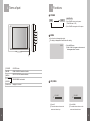
5. Functions
4. Terms of part
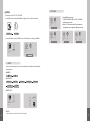
POWER
ON/OFF KEY
ON
OFF
① Push POWER button to on the power.
(STAND BY state is OFF)
② Push POWER button again to off the power.
①
②
③
④
⑤
MODE
It is a function to change video signal.
The display is disappeared 5second later after setting.
CAM1
① Push MODE button.
② CAM1 / CAM2 / AV appears on the screen and
it is disappeared after 5 seconds.
⑥
① POWER
ON/OFF button
② MODE
CAM1 / CAM2 / AV selection function
③ MENU
SETUP/ PICTURE selection function
④ UP
SOUND/ MENU level control
⑤ DOWN
⑥ S/BY LED
3 UP, DOWN
Displays STAND BY
VOLUME
70
8
VOLUME
30
① Press UP
① Press DOWN
② The monitor shows volume on the
screen and volume is up.
② The monitor shows volume on the
screen and volume is down.
9