1
12
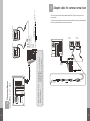
To use this function, please connect the cable as described in the drawing below between
the multi function cable of the monitor and the camera.
CIGARETTE LIGHTER
ADAPTOR
Camera 1
(optional)
Camera 2
(optional)
FOR REAR VIEW
Connect this line to “+” of reverse light lamp.
FOR SIDE VIEW
Connect this line to “+” of side light lamp.
GREEN (CAMERA 2)
DC INPUT
AUDIO
VIDEO
GREEN (CAMERA 2)
BLACK (CAMERA 1)
The monitor also includes an extra adapter cable (DDC-019A) to change from mirror
to normal view.
BLACK (CAMERA 1, Priority)
CAMERA 1, 2 / AV1
6. Connections
MDM-026A
CAMERA 1
CAMERA 2
Camera 1(Not Supplied)
Camera 2(Not Supplied)
CIGARETTE LIGHTER
SOCKET IN
7. Adapter cable for camera normal view
MDM-026A
(Supplied)
MDM-026A
(supplied)
Camera connector
13