1
BIOS CONFIGURATION
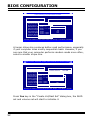
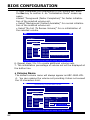
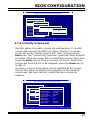
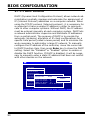
5. After completed the modification of the volume set, press
the Esc key to confirm it. An “Initialization Mode” screen appears.
•Select “Foreground (Faster Completion)” for faster initialization of the selected volume set.
• Select “Background (Instant Available)” for normal initialization of the selected volume set.
• Select “No Init (To Rescue Volume)” for no initialization of
the selected volume.
I/O Port Addr : 28000000h, F2(Tab): Select Controller, F10: Reboot System
Areca Technology Corporation RAID Controller
Main Menu
Quick Volume/Raid Setup
Volume Creation
Raid Set Function
Volume Set Functions
Volume Set Function
Volume Name : Volume Set # 00
Physical Drives
Create
VolumeRaid
Set Level
Creat Volume
Set
:5
Raid System
Function
Creat
Raid30/50/60
Capacity
: 2400.0GB
Hdd Power Delete
Management
VolumeStripe
Set
Size
64K Raid Set
Create Volume:From
Ethernet Configuration
Modify VolumeSCSI
Set Channel : 0Initialization Mode
View System
Events
Check
VolumeSCSI
Set ID Raid Set
: 0 # 00
(Faster Completion)
Clear EventStopVolume
Buffer
Check
SCSI LUN Foreground
: 0
Background
Hardware Monitor
Display Volume
Info.
Cache Mode
: Write (Instant
Back Available)
(To Rescue Volume)
System information
Tag Queuing No: Init
Enabled
ArrowKey Or AZ:Move Cursor, Enter: Select, ESC: Escape, L:Line Draw, X: Redraw
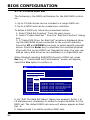
6. Repeat steps 3 to 5 to create additional volume sets.
7. The initialization percentage of volume set will be displayed at
the button line.
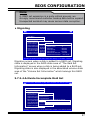
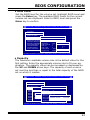
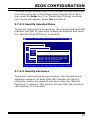
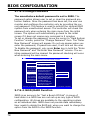
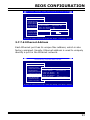
• Volume Name
The default volume name will always appear as ARC-1680-VOL
#. You can rename the volume set providing it does not exceed
the 15 characters limit.
I/O Port Addr : 28000000h, F2(Tab): Select Controller, F10: Reboot System
Areca Technology Corporation RAID Controller
Main Menu
Quick Volume/Raid Setup
Volume Creation
Raid Set Function
Set Functions
Volume SetVolume
Function
Volume Name : ARC-1680-VOL# 00
Physical Drives
Create
VolumeSet
SetRaid Level
: 5
Creat Volume
Raid System
Function
Capacity
: 2400.0GB
Creat Raid30/50/60
Hdd PowerDelete
Management
: 64K
Volume SetStripe Size
Ethernet Configuration
Modify Volume SetSCSI Channel : 0
View System
Events
SCSI Volume
ID
: 0Raid Set
Check Volume Set
Create
From
Edit
The Volume Name
Clear Event
Buffer
: 0
StopVolume
CheckSCSI LUN
A#: RC-1680-VOL#
00
Hardware Monitor
Raid
Set
00 Back
Cache
Mode
Write
Display Volume Info.
System information
Tag Queuing
: Enabled
ArrowKey Or AZ:Move Cursor, Enter: Select, ESC: Escape, L:Line Draw, X: Redraw
62