1
VIEWING/RETRIEVING MEDIA
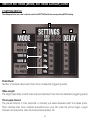
Explore the methods for viewing recorded media on your camera
SD Memory Card:
1. Remove SD Memory Card from slot in camera
2. Replace with separate, clean SD Card if you want camera to
continue work.
How To View Images/Videos
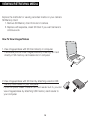
1. View images/videos with SD Card directly in computer.
If available you can view images/videos by inserting SD Card
directly in SD memory card reader slot in computer
SD
10
SD
SD
2. View images/videos with SD Card by attaching external USB
memory card reader to your computer.
If your computer doesn’t have an SD Card reader built in, you can
view images/videos by attaching USB memory card reader to
your computer.