1
ISSN(Online): 2320-9801
ISSN (Print): 2320-9798
International Journal of Innovative Research in Computer
and Communication Engineering
(An ISO 3297: 2007 Certified Organization)
Vol. 3, Issue 6, June 2015
III. IMPLEMENTATION OF COMPUTER INTERFACE SOFTWARE
The CDU of MWR has an RS232 interface to the user computer. So the software should be able to acquire
RS232 data with the following specifications:
Baud rate
Data bit
Stop bit
Parity
Flow control
:
:
:
:
:
9600
8
1
None
None
The user has to select the serial port by using the dropdown menu. The software will receive the data string from CDU
and provide an online display. The data string from MWR contains $ as starting character, date, time, filter number,
signal value and background signal value in milli-volts for all ten wavelength filters. The software identifies the starting
of the data string by using starting character $. After a scan of ten wavelengths, the software will display the data in a
tabular format with respect to the filter wavelength. The software will also display the signal value of all 10 filters with
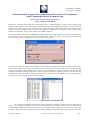
respect to time in a graphical format. The software will create a folder namely “Data” in the installation directory and
save the data in to a file inside the “data” folder. The file name will be the date of operation and will be
DDMMYYYY.acq format. There will be only one data file for a particular day and the file will be appended for
multiple data acquisition. Another feature is an Ephemeris calculator. The user can enter the required date to calculate
the declination, radius vector and equation of time. A detailed help menu is also provided to explain about the software
and the step-by-step operation of the MWR.
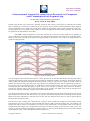
The important function which the software performs is the implementation of cloud screening algorithm which
removes the unwanted cloud points in acquired data. The software will make the Langley plot [5, 6] by using cloud
screened data and the aerosol optical depth will be calculated.
IV.RESULTS AND DISCUSSIONS
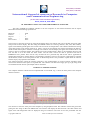
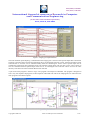
The computer Interface software has been implemented in Lab VIEW. Fig. 1 shows the front panel of the computer
interface software.
Figure 1. front panel of computer interface software
The user has to select the serial port of the computer by using dropdown menu. The indicator will become green after
getting the first string of data from MWR CDU. The software will display the date and time. The filter number and
signal value and background value are displayed using text indicators. The time of last scan performed will also
Copyright to IJIRCCE
DOI: 10.15680/ijircce.2015.0306024
5127