1
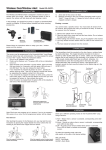
Section 4 - Testing the Sensor with M-Series Alert/Alarm System
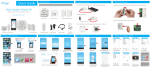
Section 5 - Testing the Sensor with SkylinkNet Alarm System
Section 6 - Installing the Garage Door Sensor
Place the sensor in the appropriate location:
1. Slide the switch at the back
of the Main Console to
Alert Mode.
2. Activate the Sensor by tilting it
from vertical to horizontal.
1. Activate the Sensor by tilting it
from vertical to horizontal.
2. The blue icon will turn red indicating
that the garage door is open.
NOTE: Ensure the mounting surface is smooth and clean.
3. The Main Console will start
beeping and flash the Zone
LED.
4. Tilt the sensor back from horizontal
to vertical and the alert sound will
stop.
Section 7 - Battery Indication/Sensor Failure
M-Series Alert/Alarm System
NOTE: The corresponding zone LED in the Main Console will flash if a sensor
failure or low battery is occurred.
When a sensor failure occurs, try the following:
1. Check if the sensor is located at where it should be.
2. Check if there is any physical damage to the sensor.
3. Move the Main Console closer to the sensor, if the red LED stops flashing,
that means the Main Console or sensor needs to be relocated.
4. Replace the battery of the sensor if the Main Console does not respond
when the sensor is activated within short range.
Mount the sensor near the top panel of your garage door with the
double-sided tape. The arrow on the garage door sensor should face left.
3. Tilt the sensor back from
horizontal to vertical
4. The red icon will turn back to blue
indicating that the garage door
is closed.
Troubleshooting M-Series Alert/Alarm System
Warranty
Problem
Solution
ONE YEAR WARRANTY
The M-Series Main Console
panel does not respond to
the sensor?
- You must program the sensor to the control
panel before they can work together.
This product is guaranteed to be free of defects in materials and
workmanship for 1 year from the date of purchase. If this product is
defective, call 1-800-304-1187 for repair or replacement parts.
Guarantee does not include normal wear and tear or batteries.
Can I erase just one sensor
from a zone in the M-Series
Main Console?
- You must erase all the sensors in that zone
and then program the sensor you want to
keep.
I have multiple sensors in a
zone and the zone LED keep
flashing indicating a sensor - You need to test each sensor individually.
failure. How do I know which
sensor is having the
problem?
If you have any questions, problems or missing parts,
please call Skylink Customer Support:
9:00am - 5:00pm EST, Monday-Friday.
1-800-304-1187
Or e-mail us at [email protected]
www.skylinkhome.com
CUSTOMER SERVICE
17 Sheard Avenue,
Brampton, Ontario,
Canada L6Y1J3
P/N : 101Y171 Rev:0
©2014 SKYLINK GROUP.