1
3.3
WIRING – CAT5 AND UTC OPTION, CONTINUED
c.
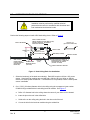
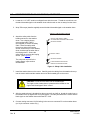
If using the UTC option, connect the coaxial cable (video and data) to the BNC
connector. The installer must supply the mating BNC connector. There are no
connections at TB3 and the data connections are not made at TB1.
d. Connect the alarm wires on the correct positions on terminal strip TB1 in the back can
module.
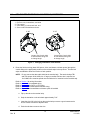
e. Dropped/Hard Ceiling Domes: Feed the excess cabling from the terminal strips back
through the cable fitting and tighten the cable clamp.
f.
Pendant Domes: Take up any excess slack in the field wiring and tape the wiring together
on the back side of the plate as close to the cable holes as possible so it does not interfere
with the rotation of the scan.
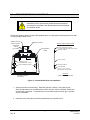
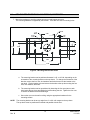
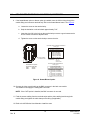
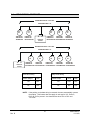
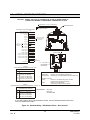
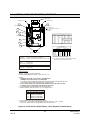
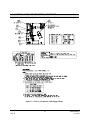
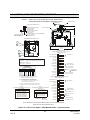
4. If this is the last dome in a daisy-chain wiring loop, the receive and transmit communication
lines must be terminated. All intermediate domes must be unterminated to pass the
communication data through. If this is the only dome on a data line, the receive and transmit
communication lines must be terminated. Refer to the jumper table in Figure 16.
5. Jumpers W3 and W4 define the type of cabling (CAT5 option or UTC option) being used for
video and data. Refer to the jumper table in Figure 16.
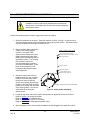
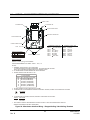
6. If the CAT5 option is used, DIP Switch SW1 must be set. The switch setting is determined
by the cable length between the video device (e.g. monitor) and the KD6. Use the lowest
switch setting possible for the cable distance. For example, if the CAT5 cable run is 900 feet,
set switch SW1-2 (600-900 feet) ON.
•
Make sure only one switch is set to ON.
Refer to the table in Figure 16.
•
If an active video receiver (e.g. NVT Model NV-652R) is
used at the monitor end, set all the switches to OFF.
If the video compensation is not strong enough at this setting,
set switch S1-1 to ON. Ensure all other switches are OFF.
•
If the UTC option is used and video cable runs are between
600 and 1000 feet, DIP Switch SW1-1 can be set to ON to
increase the gain and brighten the video. Ensure all other
switches are OFF.
33
Rev. B
KDMU000823
11/12/03