1
MED ASSOCIATES INC.
TRIADIC LEARNED HELPLESSNESS
Viewing/Changing Variable Values
Before a “start command” has been issued, any variable may be changed on the MED-PC
IV run-time screen. Simply highlight the value to change, and then enter the new value.
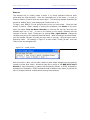
Once a session is in progress, change variables by selecting Configure | Change
Variables, or click the 4th tool bar item ΔX. In the lower left hand corner of the Change
Variables window, find the “Display Data from Box” display, and choose the chamber(s)
to modify. By clicking additional boxes in the “Additional Boxes to Update” section,
changes made to a single box are automatically loaded to all of the selected boxes.
Figure 3.11 - Changing Variables Screen
The value of any simple variable may be viewed from this screen by clicking an array on
the table and each element in that array can be viewed, as shown in Figure 3.12. To
change a value, simply highlight and replace the value in the lower right hand box or use
the up/down arrows to increment by 1. Click the Issue button for the change to take
effect. Click Named Variables to produce the display in Figure 3.13. Change variables
here as needed.
- 11 -