1
Testing sensors/zones
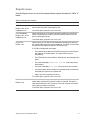
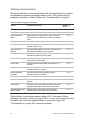
We recommend that you test sensors/zones after all programming is completed
and whenever a sensor/zone-related problem occurs. If the system does not
respond as described in Table 20 below, see “Troubleshooting” on page 38.
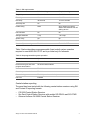
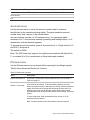
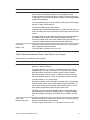
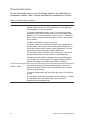
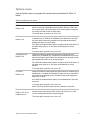
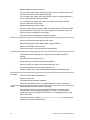
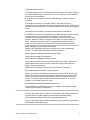
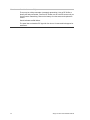
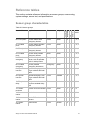
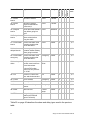
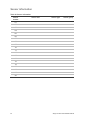
Table 20: Sensor tripping instructions
Sensor
Tripping instructions
Number of
beeps
DTIM
Initiate a sensor test.
7 to 8
Door/Window
Open the secured door or window.
7 to 8
Carbon monoxide
alarm
Unplug the alarm. Plug it back in, wait 10 seconds,
then press the test/reset button until the unit beeps 8
times.
7 to 8
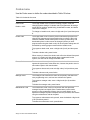
Glass guard
Tap the glass 3 or 4 in, from the sensor.
7 to 8
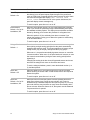
Motion sensor
Avoid the motion sensor field of view for 5 minutes,
and then enter its view.
7 to 8
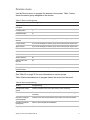
Rate-of-rise heat
detector
Rub your hands together until warm, and then place
one hand on the detector for 30 seconds.
7 to 8
Shock sensor
Tap the glass twice (away from the sensor). Wait at
least 30 seconds before testing again.
7 to 8
Smoke sensor
Press and hold the test button until the system
sounds transmission beeps.
7 to 8
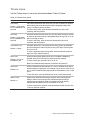
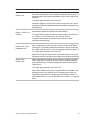
Panic button
Press and hold the appropriate panic buttons for 3
seconds.
7 to 8
Keychain touchpad
Press and hold the Lock and Unlock buttons
simultaneously for 3 seconds.
7 to 8
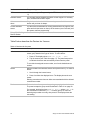
Remote handheld
touchpad
Press and hold the two emergency buttons
simultaneously for 3 seconds.
7 to 8
Hardwire loop
Open the secured door or window.
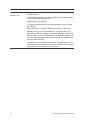
Freeze sensor
Apply ice to the sensor (do not allow the sensor to
get wet)
7 to 8
Water sensor
Press a wet rag or wet finger over both of the round
gold-plated terminals on the bottom of the sensor.
7 to 8
Dialog QS1000 Allegro
Remote Station
Open the sensor connected to the touchpad’s
hardwire loop or press the police panic buttons.
7 to 8
1
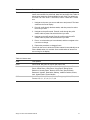
When possible, locate wireless sensors within 100 ft. of the panel. While a
transmitter may have an open-air range of 500 ft. or more, the environment at the
installation site can have a significant effect on transmitter range. See
“Troubleshooting” on page 38 to resolve the problem.
36
Allegro Control Panel Installation Manual