1
AEGI
S Br
owser
Appendi
x‘
C’
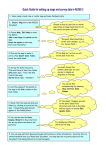
12.1 Windows XP Browser Set-up cont.
Scroll down to
Internet Protocol(TCP/IP)
and select Properties.
Select Use the following IP
Address and set the
IP address so that only the
last 2 digits differ from the
c
ont
r
ol
l
er
’
sI
Paddr
ess.
Note the present IP Address and gateway,
server settings before you modify.
You’
l
l
needt
or
es
t
or
et
hem af
t
erbr
owsi
ngt
he
controller if you use the local Ethenet jack to
connect to other devices or services
This Subnet mask will match
99.9% of controllers.
Don’
tmodi
f
yi
t
.
Leave all three of
these fields blank.
Select OK.
Aegis _Browser 8/08
70