1
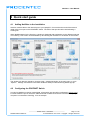
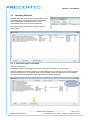
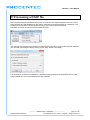
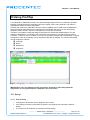
Netilities – User Manual 13 Using ProfiTap A characteristic of PROFINET is that in the data exchange telegram there is no distinction possible between controller and device telegrams when only sniffing is done using ProfiTap. This makes it impossible to determine certain information. Normally the "Search for PROFINET devices" button in Netilities can be used to ask all PROFINET devices to identify themselves and to indicate which functionality they have. For this functionality telegrams need to be sent, which is not possible if you only have a ProfiTap. Therefore it is possible to manually assign functionality to a certain MAC address/device. For the statistics visualization in combination with a ProfiTap, it is necessary to correctly assign the PNIOController. To do this, click on a station in the Live List and then press the right mouse button. A popup will appear in which a functionality can be assigned to the device, see Fig. 17. These functionalities can be assigned to a device: Controller Device Multidevice Supervisor Fig. 17 - Assigning device roles in the Live List IMPORTANT: There are different modes of operation & situations when doing Ethernet diagnostics, for using ProfiTap this is detailed in the next section. 13.1 Set-up 13.1.1 Only ProfiTap All telegrams can be seen, but no telegrams can be sent. If the startup procedure of the PNIO-Controller is not captured, the information visible is limited. A connection must be broken to insert the ProfiTap cabling Netilities-Manual-EN.docx _______________________________________________ Version 2.2.2 – June 2014 Page 45 / 68 © PROCENTEC 2011-2014 - Copyright - all rights reserved