1
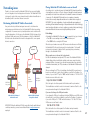
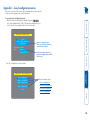
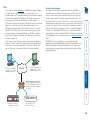
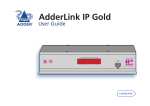
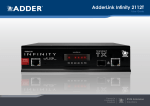
IP network/Internet The IP port allows direct connection to an Ethernet-based local network and from there onto the wider Internet. Alternatively, the robust AdderLink IP Gold security system will allow direct connection to the outside world. Modem or ISDN LOC A REM VNC 100 LNK PWR Dual formats for flexibility The AdderLink IP Gold supports both DVI digital and analog video types. It also accepts PS/2 or USB-style keyboard and mouse connections. AdderLink GOLD B Main KVM connection Power switch OR KVM switch Adder Virtual Media feature Allows an authorised remote user to transfer files and folders to a host computer, such that they appear as though presented locally on removable media (as would a memory stick, CDROM or floppy). Via the IP/modem link, the remote user can then control the host and make use of the transferred files and folders. An indispensible feature when remotely upgrading or patching distant host systems. IP network/ Internet Modem/ISDN port This port offers a connection option that can be used alongside, or instead of, the IP network link. It also offers a backup route should the network fail. Local user console The console port allows control of the system(s) by a keyboard, video monitor and mouse connected directly to the AdderLink IP Gold. Modem or ISDN Audio over IP Full stereo audio is supported both locally and remotely via the IP/modem links. One host or many On its own, the AdderLink IP Gold provides remote access to one host computer. However, when linked to a suitable KVMA switch, the remote user(s) can easily control up to 128 separate host computer. Optional power control AdderLink IP Gold provides the opportunity to attach one or more power switches. These control the supply to the host system(s) and allow the remote user to hard reset any host computer that has suffered a failure. Thank you for choosing the AdderLink IP Gold from Adder Technology. This intelligent product delivers straightforward setup, secure operation and the ability to fully control one or more computers from almost anywhere. Remote control via a network connection is nothing new and software-only solutions to facilitate this are commonplace. However, they all present two major drawbacks: a) Special software must be used on all of the computers involved, especially the host, and b) if that host ceases to operate, the remote user is powerless to intervene. AdderLink IP Gold is different and requires only the remote system(s) to run a small utility. The host system can run its usual operating system completely unchanged and needs only to be connected (via its keyboard, video and mouse ports) to the compact AdderLink IP Gold box. It is this external connection to the AdderLink IP Gold that keeps the remote user in control. Even in the midst of a system crash, the remote user can still view the host’s condition as if sitting next to it. Additionally, when the power switch option is employed, a host system can be remotely rebooted, no matter how badly it has locked-up. Digital audio is supported across the IP links, as are digital and analogue video signals. The Adder Virtual Media feature allows remote administrators to easily transfer upgrade files to any host computer. AdderLink IP Gold really starts to excel when it is hooked to a suitable KVMA switch. Then its robust, secure and adaptable operation is available across up to 128 separate host systems. Four simultaneous remote users AdderLink IP Gold can support four remote users at any one time. All of these may be connected via the IP network port or one may be linked via the modem/ISDN channel. Introduction