1
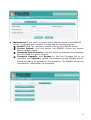
Maintenance If you want to restore factory default values of the ENNUS2 Server or upgrade new firmware, you can use the Maintenance tool. Restart: click “Yes” button to restart (reboot) the ENNUS2 Server. Factory Default: click this button, the ENNUS2 Server will restore factory default values. Download New Firmware: click this button to download new firmware from this product’s public website. Firmware Upgrade: click Browse to find the firmware file to be upgraded. Click Upload to upload the firmware into the ENNUS2 Server. Please wait about 30 seconds for the upgrading. The ENNUS2 server will automatically reboot after the upgrading. 22