1
Table of Contents
1. Introduction..................................................................................................................... 3
1.1.
About this Manual............................................................................................... 3
1.2.
Installation Requirements ................................................................................... 3
1.3.
Installation Instructions....................................................................................... 3
2. Getting Started ............................................................................................................ 4
2.1.
Your first step ..................................................................................................... 4
2.2.
Setting start and finish locations ......................................................................... 4
2.3.
Making your journey........................................................................................... 5
3. Advanced Features...................................................................................................... 6
3.1.
Adding Images .................................................................................................... 6
3.2.
Adding a Class Schedule to the Phone ............................................................... 7
3.3.
Additional Services............................................................................................. 7
3.3.1.
Finding Dining Halls................................................................................... 7
3.3.2.
Catch a Bus ................................................................................................. 7
3.3.3.
Finding ITaP Labs....................................................................................... 8
3.4.
Reporting Inappropriate Images ......................................................................... 8
4. Options Menu.............................................................................................................. 8
4.1.
Handicap Option ................................................................................................. 9
4.2.
Enabling/Disabling Photo Display...................................................................... 9
5. Troubleshooting .......................................................................................................... 9
6. Appendix..................................................................................................................... 9
6.1.
Use Cases ............................................................................................................ 9
6.2.
Security Plan ..................................................................................................... 15
Policy ........................................................................................................................ 15
Current State ............................................................................................................. 15
Requirements ............................................................................................................ 15
6.3.
Requirements Questionnaire............................................................................. 15
Figures
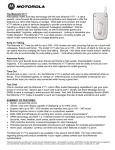
Figure 2 - Motorola MPx220 .............................................................................................. 3
Figure 3 - Windows Mobile 2003 Start Screen .................................................................. 4
Figure 4 - Selecting your current location .......................................................................... 5
Figure 5 - Selecting your desired destination ..................................................................... 5
Figure 6 - BoilerMap Directions......................................................................................... 6
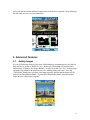
Figure 7 - camera view ....................................................................................................... 6
Figure 8 - view of current classes for day........................................................................... 7
Figure 9 - Example of an inappropriate image ................................................................... 8
2