1
Centerm Linux Manual
Index
1
2
Terminal Overview ............................................................................................................. 2
Terminal User Manual............................................................................................................... 4
2.1
Applications .................................................................................................................. 4
2.1.1
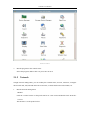
Control Center ................................................................................................... 4
2.1.2
Network ............................................................................................................. 5
2.1.3
Display ............................................................................................................ 10
2.1.4
Sound .............................................................................................................. 14
2.1.5
Mouse .............................................................................................................. 16
2.1.6
Keyboard ......................................................................................................... 17
2.1.7
User Password ................................................................................................. 18
2.1.8
Screen Lock..................................................................................................... 19
2.1.9
Network Diagnosis .......................................................................................... 20
2.1.10 VPN/ADSL ..................................................................................................... 22
2.1.11
Date/Time ........................................................................................................ 31
2.1.12 Save settings .................................................................................................... 32
2.1.13 CDMS Agent ................................................................................................... 33
2.1.14 Browser ........................................................................................................... 34
2.1.15 Service ............................................................................................................. 35
2.1.16 Start up ............................................................................................................ 37
2.1.17 Remote Desktop .............................................................................................. 37
2.1.18 Device Manager .............................................................................................. 40
2.1.19 Storage Device Manager ................................................................................. 41
2.1.20 Printer Management ........................................................................................ 44
2.1.21 Smart Card ...................................................................................................... 48
2.1.22 ICA Client ....................................................................................................... 50
2.1.23 ICA Global Setting .......................................................................................... 50
2.1.24 VMware View ................................................................................................. 51
2.1.25 Security ........................................................................................................... 51
2.2
Connection Manager ................................................................................................... 54
2.2.1
RDP Connection Guide ................................................................................... 57
2.2.2
XDMCP Connection Guide............................................................................. 64
2.2.3
ICA Connection Guide .................................................................................... 66
2.3
Instruction of System Hotkeys .................................................................................... 69
1 Terminal Overview
This terminal is a multi-functional network terminal based on embedded operation system
and supports Microsoft RDP protocol, Citrix ICA protocol and XDMCP. Through these protocols,
the terminal can connect to several different terminal servers.