1
Installation Diagram
Model
P-1014
System
Input
PRO
C HA NN EL
V ISI ON
System
Signal
Priority
L
n
TM
Zone 1
Zone 2
Zone 3
ution
US Distrib
1 x 4 A-B
IR
Zone 4
Module
Expansio
Output
Status
+12VDC
Power
+24VDC
Emitters
Local
Local
Input
R
P-1014
CHANNEL VISION
Pwr
Source
AB-303
AB-134W
IC615
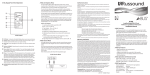
Installation - Local Source:
h Using a zone output of A-BUS hub, plug the CAT5 cable into the RJ-45 input of the
AB-303. Connect the RJ-45 output of the AB-303 into the RJ-45 input of the AB-134W.
Installation - Main Source:
h Using a CAT5 cable, take the RJ-45 output of the AB-303 into the CAT5 audio input
on the A-BUS hub.
Symptom
Not linking with
Bluetooth device
Linking with Bluetooth
device, but no audio is
present
Troubleshooting Steps
Warning: Do not adjust the volume all the way up if no audio is
present. Doing so could damage your speakers if audio reconnects.
1. Restart Bluetooth source device
2. Check Source device is connected to Wifi
3. Check the music source is active before pairing
4. The blue LED indicates when devices are paired
5. Try a different A-BUS source.
6. Make sure Bluetooth device is in play mode
3