1
Installing/ Removing Optional Accessories
Note: Always switch OFF the transceiver power when installing or
removing optional accessories.
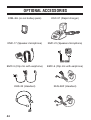
The following accessories can be used with this transceiver:
• KMC-17 Speaker-Microphone
• KMC-21 Speaker-Microphone
• KHS-22 Headset
• KHS-28F Headset
• EMC-3 Clip Microphone with Earphone
• EMC-6 Clip Microphone with Earphone
To install these accessories:
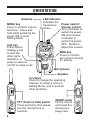
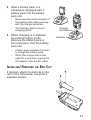
1 Open the SP/MIC tabs on the side of the transceiver.
2 Insert the accessory’s plugs into the SP/MIC jacks.
3 When you remove the accessory from the transceiver, be
sure to cover the SP/MIC jacks with the attached tabs, in
order to keep dust and dirt away from the contacts.
Note: Refer to the accessory instruction manuals for detailed
instructions on each of these accessories.
12