1
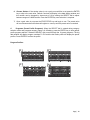
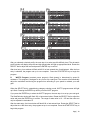
After you selected a desired profile, the next step is to select a profile difficulty level. The dot matrix
profile window will display the profile and big data window will light up appropriated level. Rotate the
SELECT dial to adjust the level and press the ENTER key to confirm.
After level entry, time window will flash with 0:00 or last entered time for adjustment. After the time
entry is selected, the program set up is now complete. Press the START/STOP key to begin the
program.
D.
WATTS Program (constant power program): Watt (power) is determined by speed &
resistance. This program is designed to let you set up a watt goal. The console will automatically
adjust the resistance level during the program time according to your speed to maintain your watt
goal.
When the SELECT dial is rotated during category selection mode, WATTS program name will light
up & flash. Pressing the ENTER key will let you enter WATT program.
If you press the ENTER key to select the WATTS program; the next step is to set up your watt goal.
The Watt/Calories window will flash 100 or last entered value. Rotate the SELECT dial to adjust the
value and press the ENTER key to confirm. The range of watts value is 10 – 350 and the value can
only be adjusted in decimals of 5.
After the watts entry, the time window will flash 0:00 or last entered time. Rotate the SELECT dial to
adjust the time. After time entry, the program set up is now complete. Press the START/STOP key to
begin this program.
Page | 19