1
Sol™ Series
4) Installation
Software / Hardware Installation
There will be a BWSpec™ Software & Spectrometer Installation Guide located on your
software CD. Refer to this guide for installation instructions.
Spectrometer Hardware Installation
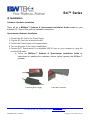
1. Connect the AC Cord to the Power Supply.
2. Plug the AC Cord into an electrical outlet.
3. Connect the Power Supply to the spectrometer.
4. Turn on the power of the supply (if applicable).
5. Connect Sol™ Spectrometer to an available USB 2.0 port on your computer by using the
included USB cable.
a. Follow the BWSpec™ Software & Spectrometer Installation Guide for
instructions on installing the necessary drivers, before opening the BWSpec™
software.
Connecting Power Supply
USB Cable Connection
19 Shea Way, Newark, DE 19713, USA ·Web: www.bwtek.com
Tel: (302) 368-7824 · Fax: (302) 368-7830 · Email: www.bwtek.com/contact
3
290020041-H (11/30/2011)
Copyright © 2011 B&W Tek, Inc.