1
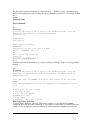
This would cause the result 10 to be writted to standard output. Similarly the result can be
placed into a variable:
#!/bin/bash
N1=2
N2=5
RESULT=`echo "$N1 * $N2"|bc`
echo "Result is $RESULT"
The basic calculator has the following basic commands:
+-*/
% Integer remainder function eg 11%3 would give 3
^ raise to the power of
sqrt square root function
Conditional Statements in Scripts
The IF Statement
The most frequently used conditional operator is the if-statement. Before considering the
if statement, it is necessary to explain something of the condition arrangement.
The test command will return an exit status (the exit status is zero if the condition is true
otherwise, it is non-zero). There are many parameters for the test command (see below) for
example –d, which causes the test command to determine if the following argument is a
directory.
Thus test –d $DIRNAME will check to see if a directory exists (in the current directory
with the name contained in the variable DIRNAME) if it does, then it will return a zero
exit status. CAUTION if you simply type the above at the command line nothing will
appear to happen, this is because you need to tell the Korn shell what to do if the test is
TRUE or NOT TRUE. This can be achieved by coupling it with the if statement.
Syntax:
if (condition)
then
[commands]
else
[commands]
fi
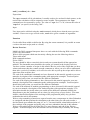
For example, the shell below displays the contents of a file on the screen using cat, but
lists the contents of a directory using ls :
#!/bin/bash
# show script
if (test -d $1)
then
ls $1
else
Page 3 of 8