1
EZ-SCREEN LP
Instruction Manual
Troubleshooting and Maintenance
Overview
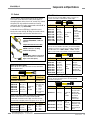
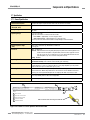
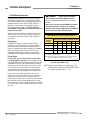
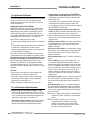
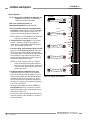
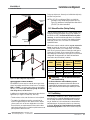
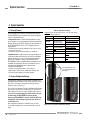
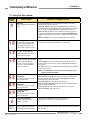
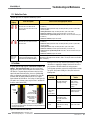
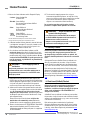
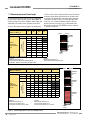
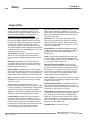
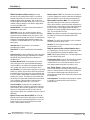
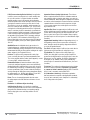
5.1.1 Receiver Error Codes
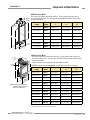
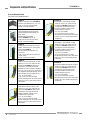
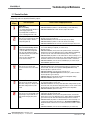
Multiple-digit codes are sequential, followed by a pause.
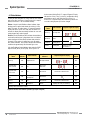
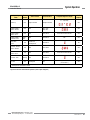
Diagnostic
Display
Error Description
Cause of Error and Appropriate Action
Output Error
Error is caused by:
• one or both outputs being shorted to a
power supply (high or low),
• by shorting OSSD 1 to OSSD 2, or
• by an overload (greater than 0.5A).
• Disconnect the OSSD loads and reset the receiver.
• If the error clears, the problem is in the OSSD load(s) or in the load wiring.
• If the error continues with no load connected, replace the receiver.
eset Input Error
R
This error occurs when the Reset switch
is closed (or the wiring is shorted to
+24V) during power-up.
• Verify that the reset switch is in the open position.
• Reset the receiver per Section 4.3.
• If the error remains, disconnect the reset wire at pin 8; cycle power.
• If the error clears, the problem is in the reset switch or in the wiring.
• If the error continues when the reset wire is disconnected, replace the receiver.
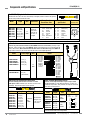
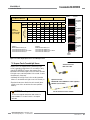
DM Input Error
E
Can occur for the following reasons:
• EDM wiring configuration does not
match the EDM switch configuration.
• No connection to EDM connections.
• Both EDM inputs fail to respond within
250 ms of each other.
• Excessive noise on EDM inputs.
• Loose QD connection(s).
• Verify that the EDM configuration switches are set correctly and that the wiring is
correct for the EDM type configured (see Section 3.5.3).
• Reset the receiver.
• If the error continues, remove power to the guarded machine, disconnect the
OSSD loads, disconnect the EDM input signals, configure EDM for No Monitoring
(Section 3.5.3) and conduct the Initial Checkout procedure in Section 3.4.
• If the error clears, the problem is in the external device contacts or wiring, or is a
response-time problem of the external devices. Verify that the EDM wiring is correct
and that the external devices meet the requirements described in Section 3.5.3.
• If the error continues, check for noise on the EDM inputs (see Section 5.3). If
error continues, replace the receiver
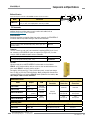
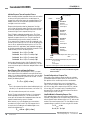
eceiver Error
R
This error can occur due to either
excessive electrical noise or an internal
failure.
• Perform a reset per Section 4.3.
• If the error clears, perform a Daily Checkout procedure (per Section 6.3; Daily
Checkout Card) and if OK, resume operation. If the System fails the Daily
Checkout procedure, replace the receiver.
• If the error continues, check the ground connection (pin 7).
• If the sensor has a good earth ground connection to pin 7, perform the Initial
Checkout procedure (per Section 3.4).
• If the error clears, check the external connections and configuration settings.
• If the error continues, replace the receiver.
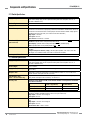
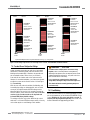
DIP Switch Error
This error can be caused by incorrect
DIP switch settings or by changes to the
DIP switch settings when the system
is ON.
• Verify that the DIP switch settings are valid (per Section 4.2). Make any corrections
necessary and perform a receiver reset.
• If the error occurred due to a change of the DIP switch settings while the System
was in Run mode, verify the switch settings and perform a receiver reset to resume
operation with the new switch settings and modified System configuration.
• If the error continues, replace the receiver.
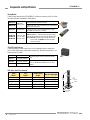
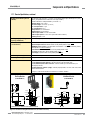
DM 1 Error
E
This error can occur due to EDM 1 input
signal failing to respond within 250 ms
of the OSSDs changing state (ON to
OFF).
• Verify that the EDM wiring is correct and that the external devices meet the
requirements described in Section 3.5.3.
• If the error continues, remove power to the guarded machine, disconnect the
OSSD loads, disconnect the EDM input signals, configure EDM for No Monitoring
(per Section 3.5.3) and conduct the Initial Checkout procedure in Section 3.4.
• If the error clears, the problem is in the External Device contacts or wiring, or is
a response-time problem of the external devices. Verify that the EDM wiring is
correct and that the external devices meet the requirements described in Section
3.5.3.
• If the error continues, check for noise on the EDM inputs (see Section 5.3).
Banner Engineering Corp. • Minneapolis, U.S.A.
www.bannerengineering.com • Tel: 763.544.3164
P/N 140044
P/N 133487
rev. A 49