1
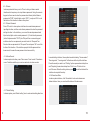
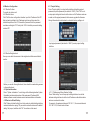
2.2 Icon Introduction
Product Overview
With the advance of technology and society, our daily life is stepping into
Name
Status Icon
Implication
the network era. The digital trend has swept through every industry as a
result of which the traditional building intercom products are developing
Night Mode
Indicate the working status of various
alarm detectors during nighttime.
Home Mode
Indicate the working status of various
alarm detectors during daytime at home.
Leave Mode
Indicate the working status of various
alarm detectors when no one is at home.
Message
Indicate unread messages.
Missed Calls
Indicate missed calls.
Network connected
Indicate the network connection is
normal.
Network disconnected
Indicate the device is not connected
with the outdoor unit.
Melody status
Indicate the melody ring tone is on.
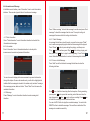
Monitor
Click to enter monitor interface.
in a more digital, network-based, information-based and intelligent way.
It is no longer a pure system for confirming the identity of visitor, but also
a intelligent home platform which provides intercom, home security,
appliance control, information access and multi-media entertainment all
in one.
Product Description
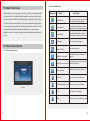
2.1 Product Appearance
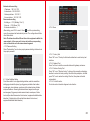
Call Management Unit Click to call Center Unit directly.
Figure 1
1
Call
Click to enter Call interface.
Menu
Click to enter Function Setting interface.
2