1
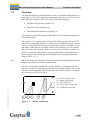
Easylon Mini PCIe Socket Interface User Manual 1.3 Product Information Overview The Easylon Mini PCIe Socket Interface realizes a LonWorks-USB interface in the design of a PCIe ”Full-Mini Card with bottom side keep outs (F2)“. It can be used in devices offering a Mini PCIe socket of the following type: Full-Mini-Only Socket (connector A) Dual-Use Socket (connector A) Dual Head-to-Head-Socket (connector A) The module uses the USB interface of the Mini PCIe slot and thus implements a LON USB interface. The module of 51 x 30 mm features a Neuron FT5000 processor and an FT-X2 transceiver running MIP firmware to connect to the LonWorks network. Alternatively a version with EIA-485 transceiver and Neuron 5000 is available. Service and traffic LED signals are available via the socket connector; a service button has to be connected externally. Status, error and service LEDs are on board. In the FTX version the LON interface is galvanically separated from the Mini PCI Express ground. The module has been designed for an extended temperature range of -40 to +85 °C. Note Due to the usage of the Neuron FT5000 or Neuron 5000 with MIP firmware this module is not suited for LNS based applications. The driver for the Easylon Mini PCIe Socket Interface is compliant with Echelon’s driver interface. Applications using the driver interface directly can use the interface without problems. The Easylon Mini PCIe Socket Interface is compatible with Gesytec’s WLDV32.DLL. LPD/UserDoc/LPD-Manual-EN-v1.2.docx v1.2, 07/02/14 (1) (2) (3) (4) (5) 1 2 Figure 1-2 3 4 Service LED, yellow Status LED, green Error LED, red type sticker on rear side LonWorks connector 5 Module components 5/27