1
■ Contents
1. Before Drawing Pictures
(1)
Outline of the advanced intelligent panel OIP .................................................................................. 1-1
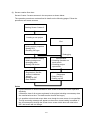
(2)
Screen creation flow chart ............................................................................................................... 1-2
(3)
Installation ....................................................................................................................................... 1-3
• Development environment ................................................................................................. 1-3
• Starting installation ............................................................................................................ 1-3
• Specifying an installation directory .................................................................................... 1-4
2. Screens
(1)
Screen configuration ........................................................................................................................ 2-1
(2)
Global screen .................................................................................................................................. 2-3
(3)
Local screen .................................................................................................................................... 2-4
3. Parts
(1)
Part configuration ............................................................................................................................ 3-1
(2)
Control ............................................................................................................................................. 3-2
(3)
Part program ................................................................................................................................... 3-2
(4)
Part background .............................................................................................................................. 3-3
4. Basic Operations
(1)
Basic operations................................................................................................................................ 4-1
(2)
Basic tool bar ................................................................................................................................... 4-2
(3)
Convenient operation procedures .................................................................................................... 4-2
5. Screen Creator 5 Operations
(1)
Starting Screen Creator 5 ................................................................................................................ 5-1
(2)
Creating a project ............................................................................................................................ 5-1
(3)
Setting the project properties ........................................................................................................... 5-2
(4)
Restoring old model data
(5)
Exiting Screen Creator 5 ................................................................................................................. 5-4
(For reference) ..................................................................................... 5-3
6. Creating Simple Screens
(1)
Creating a new screen ..................................................................................................................... 6-1
6.1 Arranging Switches .................................................................................................................................. 6-2