1
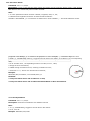
1. IP is your server‟s IP or the domain name.
2. Port: [1,65534]
Example:
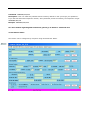
W000000,012,183.61.0.83,7788
W000000,012,www.track.com,7788 SMS query machine set TCP, IP port, APN, device ID
SMS commands to w*******, 701
Example:
W000000,701
TCP,183.61.0.83,8887,cmnet,card,card,139666666661
7.5.4 Set DNS Server IP (optional)
Command: W******,009,DNS Server IP
Description: In case the domain name you set by the last command (W******,012,IP, Port) doesn‟t work,
which means your server IP is not properly set. You can first use this command to set DNS Server IP (please
check with your DNS server provider for the DNS Server IP) and then redo the command W******,012,IP,
Port.
Example: W000000,009,220.23.4.90
7.5.5 Enable GPRS Tracking
Command: W******,013,X
Description: Enable GPRS tracking function.
Note:
X=0, to turn off GPRS tracking (default);
X=1, to enable GPRS tracking via TCP
X=2, to enable GPRS tracking via UDP
Example: W000000,013,1
7.5.6 Set GPRS Time tracking
SMS commands: W******, 014, XXXXX
Description: set GPRS to upload the positioning information packet interval.
Explain.
XXXXX is the 5 digit, to 1 second as unit.
XXXXX=00000, closed
XXXXX=00001~65535, upload time interval (in seconds as a unit)
For example: W00000001400060
Position every 60 seconds to upload a GPRS data.
7.5.7 Set GPRS Interval
Command: W******,014,XXXXX
Description: Set time interval for sending GPRS packets.
Note:
XXXXX should be in five digits and in unit of 10 seconds.
XXXXX=00000, to turn off this function;
XXXXX=00001~65535, time interval for sending GPRS packet and in unit of 10 seconds.
In this example, the tracker will send every 600 seconds (10 minutes).
Example: W000000,014,00060
The tracker will send every 600 seconds (10 minutes).