1
User Manual
Repeater Orion 2
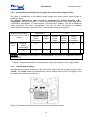
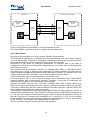
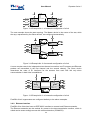
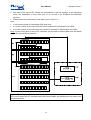
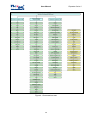
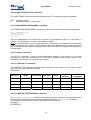
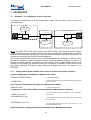
Changes in configurations, which are part of a group of configurations requiring confirmations
are initially written into the new configuration. After the administrator confirms changes in the
group of configurations, this group is copied from the new configuration into the running
configuration and the device starts functioning according to these configurations. The
administrator also can confirm changes in all groups. After the received running configuration is
checked, the administrator can confirm this configuration in this case changes in all groups are
copied from the running configuration into the startup configuration (see Figure 4.3).
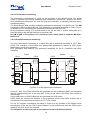
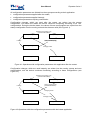
Restoring from backup copy
(command RESTORE)
Startup configuration
Loading
Confirming of changes
(command CONFIRM)
Loading
Backup configuration
Saving of backup copy
(command BACKUP)
Running configuration
Appling of changes
(command APPLY)
New configuration
Changing values
Configuration changing
Figure 4.3 Operations with configuration parameters that should be confirmed.
4.4
Groups of commands requiring confirmation
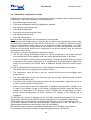
The following four groups of parameters require confirmation in Orion 2 devices: LINE, NET,
VLAN and SNMP. Configurations of each group change by using special commands (see Fig.
2.13). The APPLY <name of the group> command is used to apply changes in configurations
performed in a group. After this, the unit applies changes in configurations. If groups LINE, NET,
VLAN were changed not in the local management session via the RS-232 interface of the shelf
but via TELNET the management session breaks and the unit waits for the second connection
within 5 minutes (for the LINE group – 30 minutes). If the LINE group was changed remotely
(using the CONNECT command), the unit waits for the second connection within 30 minutes. If
within this time the operator did not enter the modem menu, the changed parameters are read
from the startup configuration of the unit. Therefore, it is possible to restore the configurations of
the unit.
A “successful” configuration can become the startup configuration by using the CONFIRM
command.
51