1
INSTALLATION
When a second version of CrysAlisPro is started or, if CrysAlisPro is opened on a standalone PC, this
'offline' version will open in data reduction mode only (without control of the devices and diffractometer
control) and will ask the user to select the 'experiment' that they want to work on from the experiment
database.
2.1.1 Select experiment
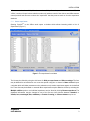
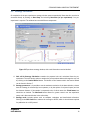
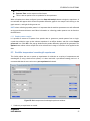
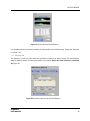
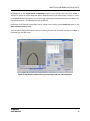
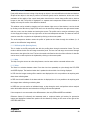
Opening CrysAlisPro in the offline mode opens a window which allows browsing within a list of
experiments (Figure 1).
Figure 1: The experiment list window
The list may be refined by using the tick boxes for Hide pre-experiments and Hide screenings. The lists
may be defined for an individual or over a set time period: using the >> button in Name of list will open
a window which will allow parameters to be selected so only certain experiments appear in the defined
list. These lists may be deleted or removed. More experiments may be added to the list by selecting the
Multiple addition option or an individual experiment may be found by clicking Browse experiment. The
displayed information may be changed to one of the pre-set views (choose between Standard, or
Volume, laue, wavelength, Rint, redundancy or Protein screening) or Custom columns may be set.
CrysAlisPro
USER MANUAL
3