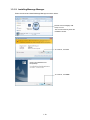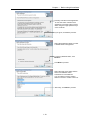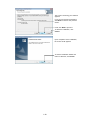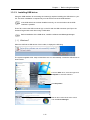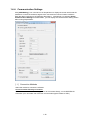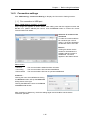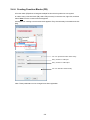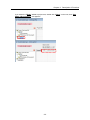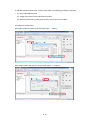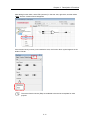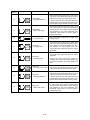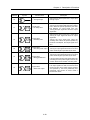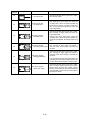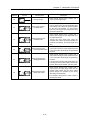
1
Instruction Manual Inverter Support Software FRENIC Visual Customizer for FRENIC-Ace series Thank you for purchasing our high-performance, multipurpose FRENIC-Ace Series inverter. • This manual provides all the information on Fuji’s inverter support software FRENIC Visual Customizer Read this manual carefully for correct use of FRENIC Visual Customizer • This manual does not contain information on the inverter itself. Read the inverter user's manual, inverter instruction manual in conjunction with this manual. • Incorrect handling may prevent the software from operating correctly, shorten the inverter service life, or cause problems. Fuji Electric Co., Ltd. INR-SI47-1811a-E Copyright © 2014 Fuji Electric Co., Ltd. All rights reserved. No part of this publication may be reproduced or copied without prior written permission from Fuji Electric Co., Ltd. Microsoft and Windows are registered trademarks of Microsoft Corporation in the United States. All other products and company names mentioned in this manual are trademarks or registered trademarks of their respective holders. The information contained herein is subject to change without prior notice for improvement. Preface This manual provides all the information on Fuji’s inverter support software FRENIC Visual Customizer. Read this manual carefully for correct use of FRENIC Visual Customizer. This manual does not contain information on the inverter itself. Read the inverter user's manual, inverter instruction manual in conjunction with this manual. Incorrect handling may prevent the software from operating correctly, shorten the inverter service life, or cause problems. ■ Safety Precautions Read this manual thoroughly before proceeding with installation, connections (wiring), or operation. Ensure you have sound knowledge of the device and software and have familiarized yourself with all safety information and precautions before proceeding to operate the inverter via FRENIC Visual Customizer Safety precautions are classified into the following two categories in this manual. Failure to heed the information indicated by this symbol may result in death or serious injury. Failure to heed the information indicated by this symbol may result in minor or light injury and/or substantial property damage. Wiring and Connection of Cables • Be sure to turn off the power to the inverters and related devices before making RS-485 connection. Risk of electric shock if this warning is not heeded. • In the case connect the RJ45 connector of the inverter unit, check the pin assignment before connecting. For details, refer to Chapter 1, Section 1.2.3.2 "Pin assignment for RS-485 port (RJ-45 connector)." An accident or mechanical failure could occur if this warning is not heeded. Operation • Resetting an alarm with a run command being ON will cause the inverter to run the motor unexpectedly. An accident or injury could occur. Customizable function ・ Ensure safety before modifying customizable function related function code settings (U codes, U1 codes and related function codes) or making customizable function active. Depending upon the settings, such modification or activation of the customizable function may change the operation sequence to cause a sudden motor start or an unexpected motor operation. An accident or injuries could occur. i Contents Preface ......................................................................................................................................................................i Chapter 1 Before using this software.................................................................................................................... 1-1 1.1. Overview..................................................................................................................................................... 1-1 1.1.1. Features ............................................................................................................................................... 1-1 1.1.2. FRENIC Visual Customizer functions ................................................................................................... 1-1 1.1.3. Warranty ............................................................................................................................................... 1-1 1.2. Connecting Inverters to a PC...................................................................................................................... 1-2 1.2.1. Connection ........................................................................................................................................... 1-2 1.2.2. Configuring USB network ..................................................................................................................... 1-3 1.2.2.1. Example of networking ................................................................................................................... 1-3 1.2.3. Configuring an RS-485 communications network................................................................................. 1-4 1.2.3.1. Example of networking ................................................................................................................... 1-4 1.2.3.2. Pin assignment of RJ45 connector ................................................................................................. 1-5 1.2.3.3. Communications support devices for RS-485 communication........................................................ 1-7 1.2.3.4. Noise suppression .......................................................................................................................... 1-8 1.3. Installation................................................................................................................................................... 1-9 1.3.1. Installing software................................................................................................................................. 1-9 1.3.1.1. Installing FRENIC Visual Customizer ........................................................................................... 1-10 [ 1 ] Windows 7 / Windows Vista ............................................................................................................ 1-10 [ 2 ] Windows XP ................................................................................................................................... 1-14 1.3.1.2. Installing Message Manager ......................................................................................................... 1-18 1.3.1.3. Installing USB driver ..................................................................................................................... 1-21 [ 1 ] Windows 7 ...................................................................................................................................... 1-21 [ 2 ] Windows Vista ................................................................................................................................ 1-25 [ 3 ] Windows XP ................................................................................................................................... 1-28 1.3.1.4. Checking the installation of the USB driver................................................................................... 1-30 1.3.2. Uninstallation ...................................................................................................................................... 1-31 1.3.2.1. Uninstalling FRENIC Visual Customizer ....................................................................................... 1-31 [ 1 ] Windows 7 / Windows Vista ............................................................................................................ 1-31 [ 2 ] Windows XP ................................................................................................................................... 1-32 1.3.2.2. Before uninstalling Message Manager.......................................................................................... 1-33 [ 1 ] Windows 7 ...................................................................................................................................... 1-33 [ 2 ] Windows Vista / XP......................................................................................................................... 1-34 1.3.2.3. Uninstalling Message Manager .................................................................................................... 1-34 [ 1 ] Windows 7 / Windows Vista ............................................................................................................ 1-34 [ 2 ] Windows XP ................................................................................................................................... 1-35 1.4. Configuring the Settings ........................................................................................................................... 1-37 1.4.1. Configuring communication-related function codes in the inverter ..................................................... 1-37 [ 1 ] Communication port 1..................................................................................................................... 1-37 [ 2 ] Communication port 2..................................................................................................................... 1-37 1.4.2. Checking the COM port on the PC (when using a communications level converter) ....................... 1-38 1.4.3. FRENIC Visual Customizer Start ........................................................................................................ 1-39 ii 1.4.4. Communication Settings..................................................................................................................... 1-42 [ 1 ] Connection Methods ....................................................................................................................... 1-42 [ 2 ] Port ................................................................................................................................................. 1-43 [ 3 ] Communication Conditions ............................................................................................................. 1-44 [ 4 ] Perform Connection Check............................................................................................................. 1-44 1.4.5. Connection settings ............................................................................................................................ 1-45 [ 1 ] For connection to USB port............................................................................................................. 1-45 [ 2 ] For connection to RS-485 port........................................................................................................ 1-46 Chapter 2 Description of Functions ...................................................................................................................... 2-1 2.1. Selecting the Language .............................................................................................................................. 2-1 2.2. Selecting Project......................................................................................................................................... 2-2 2.3. Main Window .............................................................................................................................................. 2-3 2.4. Customizable Function Creation Procedure ............................................................................................... 2-4 2.4.1. Layout function symbols ....................................................................................................................... 2-5 2.4.2. Parameters of Function Symbols.......................................................................................................... 2-5 2.4.3. Connecting Function symbols .............................................................................................................. 2-7 2.4.4. Creating Function Blocks (FB).............................................................................................................. 2-8 2.4.5. Assigning Step Numbers .................................................................................................................... 2-13 2.4.5.1. Rules of number assignment ........................................................................................................ 2-13 2.4.5.2. Automatic Step No. Assignment (Function Check) ....................................................................... 2-14 2.4.5.3. Manual Step No. Assignment........................................................................................................ 2-16 2.4.6. Downloading to the Inverter................................................................................................................ 2-18 2.4.7. Comparison ........................................................................................................................................ 2-19 2.5. Debug ....................................................................................................................................................... 2-21 2.5.1. Online Monitor .................................................................................................................................... 2-21 2.5.2. Trace Monitor ..................................................................................................................................... 2-23 2.6. List of Customizable function Symbols ..................................................................................................... 2-27 2.7. Specifications of Customizable function.................................................................................................... 2-41 Chapter 3 Frequently asked questions (FAQ) ...................................................................................................... 3-1 3.1. Cannot communicate with inverter (Failed to get inverter information)............................................ 3-1 3.1.1. Message Manager not installed correctly ............................................................................................. 3-1 3.1.2. USB driver not installed correctly.......................................................................................................... 3-2 3.1.3. USB driver installed correctly................................................................................................................ 3-7 3.1.4. USB communication impossible after the PC has gone standby or to sleep) ....................................... 3-8 Chapter 4 Specifications....................................................................................................................................... 4-1 iii Chapter 1 Before using this software Chapter 1 Before using this software This chapter gives an overview of the inverter support software FRENIC Visual Customizer and provisions for its installation and operation. 1.1. Overview 1.1.1. Features ・ The customizable function on an inverter can be managed and settings specified with simple operations via the RS-485 port or the USB port on the keypad (TP-E1U). ・This software can not be used in the CAN bus. When connecting the inverter to a PC via the USB port, be sure to connect them, one to one. Do not use a USB hub. 1.1.2. FRENIC Visual Customizer functions Function Overview Customizable function editing Draws functions and sends them to the inverter using a graphical editing tool. Real-time trace Displays the customizable function operation status with a waveform in real time. Communication settings Specifies settings for communicating with the inverter. 1.1.3. Warranty Limited Warranty In no event will Fuji Electric Co., Ltd. be held liable for any damage (including, but not limited to lost profit, suspension or interruption of operations, loss of operational data or other monetary loss) whatsoever resulting from the use of the software or malfunction of the same or from information contained in this document. 1-1 1.2. Connecting Inverters to a PC 1.2.1. Connection The table below lists the connection methods available for connecting inverters to a PC. PC : Inverters 1:1 On PC On inverter USB USB (keypad) Using a USB cable USB RS-485 Via an USB / RS-485 converter COM port (RS-232C) RS-485 USB RS-485 COM port (RS-232C) RS-485 1:n Connection Via a RS-232C / RS-485 converter Via a RS-232C / RS-485 converter When using a RJ-45 connector, use a branch adapter for multi-drop connection for each of the 2nd and the subsequent inverters. Via an RS-232C / RS-485 converter 1) For details about the RS-232C / RS-485 converter and USB / RS-485 converter, refer to Section 1.2.3.3. "Communications support devices for RS-485 communication". 2) To minimize the effects of noise, separate the signal lines from the power lines. Refer to Section 1.2.3.4. "Noise suppression”. 3) The inverter cannot be concurrently shared by the software-running PC and other host equipment (e.g., PLC). To use the software, therefore, be sure to disconnect the cables of other host equipment from the RS-485 port on the inverter. 4) For multi-drop connection of inverters, assign different station addresses to each of the inverters connected. • Be sure to turn off the power to the inverters and related devices before making RS-485 connection. Risk of electric shock if this warning is not heeded. • If connecting wires to the RJ45 connector (FRENIC- Ace) for inverter unit keypad connection, or the RS-485 communication RJ45 connector (FRENIC-Ace), check the wiring on the devices to be connected before connecting. For details, refer to Chapter 1, Section 1.2.3.2 "Pin assignment for RS-485 port (RJ-45 connector)." An accident or mechanical failure could occur if this warning is not heeded. 1-2 Chapter 1 Before using this software 1.2.2. Configuring USB network 1.2.2.1. Example of networking To configure a USB network connecting the inverter and a Loader-running PC, use a commercially available USB cable (mini B connector). (See below.) Connection using the USB connector For connection using the USB connector, refer to Section 1.4.4. "Setting up communications parameters." FRENIC-Ace USB A connector USB cable PC USB mini B connector (Keypad TP-E1U) Figure 1.2.2-1 USB Network Using a USB Cable (mini B) Table 1.2.2-1 Specifications of USB Network Specifications USB 1.1 compliant Transmission speed 12M bps Wiring length Max. 5 m Connector USB mini B connector Power supply When connected to the inverter: Self-powered When connected to the keypad: Bus-powered When connecting the inverter to a PC via the USB port, be sure to connect them, one to one. Do not use a USB hub. 1-3 1.2.3. Configuring an RS-485 communications network 1.2.3.1. Example of networking To configure an RS-485 communications network connecting inverters and an software-running PC, use a LAN cable having an RJ-45 connector at both ends. Refer to Section 1.2.3.3, [ 2 ] "Requirements for the cable." (See below.) Multi-drop network using the RJ-45 connector For multi-drop connection of inverters, use a branch adapter(s) for multi-drop connection and RS-485 communications network as shown below. For connection via the RS-485 port, refer to Section 1.4.3.1 "Setting up communications parameters." FRENIC-Ace FRENIC-Ace PC running FRENIC Visual Customizer FRENIC-Ace Figure 1.2 RS-485 Multi-drop Network using RJ-45 Connectors The RJ-45 connector on the inverter has pins to which the keypad power is assigned for remote keypad operation. Do not use these pins when connecting any other equipment to the RJ-45 connector. (See Figure 1.3 on the next page.) When selecting communications support devices that protect parts on the printed circuit boards of inverters from damage or malfunction due to external electrical noise or to keep the network in high noise immunity level, carefully read through the descriptions in Section 1.2.3.3 "Communications support devices for RS-485 communication." The maximum cable length on the RS-485 communications network is 500 m. 1-4 Chapter 1 Before using this software 1.2.3.2. Pin assignment of RJ45 connector There are two communication ports of RJ45 connector. Communication port 1: Connector for the keypad Communication port 2: Connector or terminal on the terminal PCB [1] Communication port 1 In order to facilitate connection to a standard RS-232C–RS-485 converter, the inverter's RS-485 port is designed to be compliant with the standard 4 pairs signal line pin assignment for the RJ-45 connector, where a pair of signal lines DX- and DX+ are assigned to #4 and #5 pins as shown in Figure 1.3. The power fed lines to the keypad occupy #1, #2, #7 and #8 pins. Do not use these pins when connecting equipment other than the keypad to this port. Figure 1.3 Standard RS-485 Port and RJ-45 Connector of the communication port 1 Pin Assignment Table 1.2 RJ-45 of the communication port 1 Pin Assignments on the FRENIC Series of Inverters Pin # Assignment Remarks 1 Vcc (+5 V) 2 GND Using these pins may cause a short-circuit between the Vcc and GND lines. 3 NC 4 DX- 5 DX+ 6 NC 7 GND 8 Vcc (+5 V) No connection. A pair of RS-485 communications lines No connection. Using these pins may cause a short-circuit between the Vcc and GND lines. 1-5 [2] Communication port 2 (FRNIC-Ace -J,-A,-E,-U, -K only) Figure 1.3 Standard RS-485 Port and RJ-45 Connector of the communication port 2 Pin Assignment Table 1.3 RJ-45 of the communication port 2 Pin Assignments on the FRENIC Series of Inverters Pin # Assignment Remarks 1 CAN+ For the CAN communication data (+) terminals (It is not used in an software.) 2 CANGND 3 CAN- 4 DX- 5 DX+ 6 NC 7 GND 8 NC For the CAN ground signal For the CAN communication data (-) terminals (It is not used in an software.) A pair of RS-485 communications lines No connection. Ground signal No connection. 1-6 Chapter 1 Before using this software 1.2.3.3. Communications support devices for RS-485 communication This section describes the devices required for connecting the inverter to a PC having no RS-485 port or for connecting two or more inverters in multi-drop network. [1] Communications level converters Usually PCs are not equipped with an RS-485 port but with an RS-232C port. To connect inverters to a PC, therefore, you need an RS-232C–RS-485 converter or a USB–RS-485 converter*. To run the software correctly, use a converter satisfying the requirements given below. * The USB–RS-485 converter should be a product that is compatible with the conventional COM port by emulation of a virtual COM port device driver. Requirements for recommended communications level converters Send/receive switching: Electric isolation: Fail-safe: Other requirements: Auto-switching by monitoring of send/receive data status at the PC (RS-232C) Electrically isolated from the RS-485 port Fail-safe facility* Superior noise immunity * The fail-safe facility refers to a feature that ensures the RS-485 receiver's output at "High" (logical value = 0) even if the RS-485 receiver's input is opened or short-circuited or all the RS-485 drivers are inactive. Refer to Figure 1.4. Recommended converters System Sacom Corporation (Japan) : KS-485PTI (RS-232CRS-485 converter) : USB-485I RJ45-T4P (USBRS-485 converter) or its equivalent one. Send/receive switching system The RS-485 communications system of the inverter acts in half-duplex mode (2-wire) so the converter must feature a send/receive switching circuitry. Generally, the switching system may be either one of the following. (1) Auto-switching by monitoring of send/receive data (2) Switching by RS-232C control signal of RTS or DTR (hardware flow control system) Driver Computer Driver RS-232C Level conversion Receiver input Re ceiver input Transmission/ receiving 送受信切換 switching D riv er enable Driver e na ble Recei ver outp ut Receiver output Receiver enab le Receiver enable Receiver RS-485 RS-232C— RS-485 converter 1-7 Receiver FRENIC-Ace (two-wire system) Figure 1.4 Communications Level Conversion [2] Requirements for the cable Use a standard 10BASE-T/100BASE-TX LAN cable (US ANSI/TIA/EIA-568A category 5 compliant, straight type). The RJ-45 connector (COM port 1) has power source pins (pins 1, 2, 7 and 8) exclusively assigned to keypads. When connecting other devices to the RJ-45 connector, take care not to use those pins. Using them will cause a short-circuit hazard. Use pins 4 and 5 only. [3] Branch adapter for multi-drop An RS-485 communications networks for the inverters utilizes 2-wire 10BASE-T LAN cables fitted with an RJ-45 connector at both ends. To connect those inverters to the network in multi-drop mode, use branch adapters for multi-drop. Recommended branch adapter SK Koki (Japan): MS8-BA-JJJ or its equivalent one. 1.2.3.4. Noise suppression Depending on the operating environment, instruments may malfunction due to the noise generated by the inverter. Possible measures to prevent such malfunction are: separating the wiring, use of shielded cable, isolating the power supply, and adding an inductance component. Show below is an example of adding an inductance component. Adding inductance components To suppress or eliminate noise for keeping the network in high noise immunity level, insert inductance components such as choke coils in series in the signal circuit, or pass the RS-485 communications cable through a ferrite core ring or wind it around by 2 or 3 turns as shown below to keep the impedance of the signal lines high. Ferrite core RS-485 communications cable RS-485 converter Inverter Pass the wiring through the ferrite core or wind the ferrite core with the wiring a few times Figure 1.2.3-1 Adding an Inductance Component 1-8 Chapter 1 Before using this software 1.3. Installation 1.3.1. Installing software Before installation Execute the following before installation. Check items Requirements Windows OS Microsoft Windows XP, Vista (32-bit), or 7 (32-bit / 64-bit) Hard disk storage area Free space of approx. 9 MB or more Other applications Terminate all the applications being in execution. Uninstalling the Earlier version of the software If any earlier versions of FRENIC Visual Customizer have been installed on your PC, uninstall it. Uninstalling the Message Manager of VG7 loader If Message Manager of VG7 loader has been installed on your PC, uninstall it. Download the [FRENIC Visual Customizer Setup.exe] and [MsgMgr USB Setup. exe] file from the Fuji Electric website or get it in any media. Then copy it into an appropriate folder (e.g., C:¥Documents and Settings¥User¥My Documents¥FRN_Loader in this manual). To use FRENIC Visual Customizer, you need to install two setup files: the software main program [FRENIC Visual Customizer Setup.exe] and the message manager [MsgMgr USB Setup.exe] that manages communications. However, this is not necessary if "FRENIC Loader 3.x" is already installed. To install the software, install with an account that has sufficient authority to install the software. 1-9 1.3.1.1. Installing FRENIC Visual Customizer [ 1 ] Windows 7 / Windows Vista Follow the wizard and install the software as shown below. Double-click the FRENIC Visual Customizer Setup.exe icon. The exe automatically starts the installation wizard. To continue, click Install. * Windows 7 only To continue, click Yes. 1-10 Chapter 1 Before using this software * Windows Vista only To continue, click Allow. To continue, click Next. Carefully read the license agreement. To view the entire contents of the agreement, scroll the screen up and down using the Page Up/Down keys or the scroll bar. If you agree, click Next to proceed. 1-11 Enter your user name and company name. After entry, click Next to proceed. Select the destination folder to install. A default folder has appeared. To select a different folder, click Browse…. Click Next to proceed. The screen confirming your selection appears. If you want to change the selection, click Back to return to the previous screen. If OK, click Install to proceed. To abort the installation, click Cancel. 1-12 Chapter 1 Before using this software To continue, click Yes. Upon completion of the installation, the screen at left appears. To exit the installation wizard and return to Windows, click Finish. 1-13 [ 2 ] Windows XP Follow the wizard and install the software as shown below. Double-click the FRENIC Visual Customizer Setup.exe icon. The exe automatically starts the installation wizard. To continue, click Install. To abort the installation, click Cancel. 1-14 Chapter 1 Before using this software To continue, click Next. Carefully read the license agreement. To view the entire contents of the agreement, scroll the screen up and down using the Page Up/Down keys or the scroll bar. If you agree, click Next to proceed. Enter your user name and company name. After entry, click Next to proceed. 1-15 Select the destination folder to install. A default folder has appeared. To select a different folder, click Browse…. Click Next to proceed. The screen confirming your selection appears. If you want to change the selection, click Back to return to the previous screen. When it is ready to restart, click Yes Install. *If you do not restart FRENIC Visual Customizer, the program cannot be normally installed. The installation progress bar appears. To abort the installation, click Cancel. 1-16 Chapter 1 Before using this software Upon completion of the installation, the screen at left appears. To exit the installation wizard and return to Windows, click Finish. When it is ready to restart, click Yes. *If you do not restart FRENIC Visual Customizer, the program cannot be normally installed. 1-17 1.3.1.2. Installing Message Manager Follow the wizard and install Message Manager as shown below. Double-click the MsgMgr USB Setup.exe icon. The exe automatically starts the installation wizard. To continue, click Yes. To continue, click Next. 1-18 Chapter 1 Before using this software Carefully read the license agreement. To view the entire contents of the agreement, scroll the screen up and down using the Page Up/Down keys or the scroll bar. If you agree, click Yes to proceed. Select the destination folder to install. A default folder has appeared. To select a different folder, click Browse…. Click Next to proceed. Select the start menu folder that the shortcut to FRENIC Visual Customizer is to be added to. You can select one from existing folders in the list or create a new one. After entry, click Next to proceed. 1-19 The screen confirming your selection appears. If you want to change the selection, click Back to return to the previous screen. If OK, click Next to proceed. To abort the installation, click Cancel. Upon completion of the installation, the screen at left appears. To exit the installation wizard and return to Windows, click Finish. 1-20 Chapter 1 Before using this software 1.3.1.3. Installing USB driver Using the USB interface for accessing the inverter(s) requires installing the USB driver to your PC. The driver installation is required only once at the first use of the USB interface. If the USB driver has not been installed correctly, no communication via the USB interface is possible. First of all, connect the USB connector (A) on the PC and the USB connector (mini B) on the inverter's keypad with each other using a USB cable. Before installation of the USB driver, install the software and Message Manager. [ 1 ] Windows 7 When the OS finds a USB device of the Loader, it displays the following. The system-supplied driver setup wizard does not run automatically. Install the USB driver as shown below. From the Start menu, select and right-click Computer to show the submenu. Click Properties. Wait for the Control Panel Home screen and click Device Manager. 1-21 On the Device Manager window, right-click Unknown device to show the drop-down list. Click Update Driver Software…. Click Browse my computer for driver software. Click Browse…. 1-22 Chapter 1 Before using this software In the folder in which FRENIC Visual Customizer has been installed, select ¥Driver¥MICREXSX and then click OK. The default folder is C:¥Fuji Electric ¥FRENIC Visual Customizer¥Driver¥ MICREXSX when the OS drive is C. To continue, click Next. Click Install this driver software anyway. 1-23 Upon completion of the installation, the screen at left appears. To exit the installation wizard and return to Windows, click Close. 1-24 Chapter 1 Before using this software [ 2 ] Windows Vista When the OS finds a USB device of the software, it displays the following. Follow the wizard and install the software as shown below. Click Locate and install driver software. Click Continue to proceed. Click Don’t search online. 1-25 Click Browse my computer for driver software (advanced). Click Browse…. In the folder in which FRENIC Visual Customizer has been installed, select ¥Driver¥MICREXSX and then click OK. The default folder is C:¥ Fuji Electric ¥FRENIC Visual Customizer¥Driver¥ MICREXSX when the OS drive is C. To continue, click Next. 1-26 Chapter 1 Before using this software Click Install this driver software anyway. Upon completion of the installation, the screen at left appears. To exit the installation wizard and return to Windows, click Close. This message appears when the USB driver has been successfully installed. 1-27 [ 3 ] Windows XP When the OS finds a USB device of the software, it displays the following. Follow the wizard and install the software as shown below. Wait for this screen to appear, select Yes, now and every time I connect a device, then click Next. Select Install from a list or specific location (Advanced), then click Next. Select Search for the best driver in these locations and the Include this location in the search check box, then click Browse…. 1-28 Chapter 1 Before using this software In the folder in which FRENIC Visual Customizer has been installed, select ¥Driver¥MICREXSX and then click OK. The default folder is C:¥Fuji Electric ¥FRENIC Visual Customizer¥Driver¥ MICREXSX when the OS drive is C. Click Next. Installation starts. Upon completion of the installation, the screen at left appears. To exit the installation wizard and return to Windows, click Finish. 1-29 1.3.1.4. Checking the installation of the USB driver To check whether the USB driver has been installed correctly, open Device Manager. If FRENIC is added to the sub-tree of the software USB device, the driver has been installed correctly. Installation finished successfully Installation failed 1-30 Chapter 1 Before using this software 1.3.2. Uninstallation 1.3.2.1. Uninstalling FRENIC Visual Customizer [ 1 ] Windows 7 / Windows Vista From the Start menu, select All Programs | Fujielectric | FRENIC Visual Customizer | FRENIC Visual Customizer Uninstall. The confirmation screen at left appears. Click Yes. The confirmation screen at left appears. Click Yes. 1-31 The uninstallation progress bar appears. To abort the uninstallation, click Cancel. In the above procedure, perform the uninstallation. [ 2 ] Windows XP From the Start menu, select All Programs | FRENIC Visual Customizer | FRENIC Visual Customizer Uninstall. The uninstallation confirmation screen appears as shown left. To proceed and uninstall the software, click Yes. The uninstallation progress bar appears. To abort the uninstallation, click Cancel. In the above procedure, perform the uninstallation. 1-32 Chapter 1 Before using this software 1.3.2.2. Before uninstalling Message Manager Before uninstalling Message Manager, be sure to quit both the software and Message Manager. Quitting Message Manager Message Manager is software that manages communication between the PC and inverters. To make sure that Message Manager has quitted, check that no Message Manager icon is displayed in the task tray. If the icon is displayed, right-click it to quit Message Manager. If doing so cannot quit it, shut down or log off Windows. Once you uninstall the software when Message Manager is running, a new version of the software installed after that cannot run properly, that is, it may no longer be able to recognize inverters. If this happens, first delete the folder (including its contents) named Fuji Electric Shared in the file path as shown below, and then reinstall the software. C:¥Program Files¥Common Files¥Fuji Electric Shared (In the file path shown above, "C" represents the drive letter of the partition or hard disk where Windows is installed. If Windows is installed on a different drive in your system, replace "C" with the letter corresponding to that drive.) Quitting Message Manager [ 1 ] Windows 7 Click this to display the hidden icons as shown below. Right-click this icon to display Exit MessageManager, then click it. The confirmation window appears. Click Yes to quit Message Manager. 1-33 [ 2 ] Windows Vista / XP Right-click the Message Manager icon to display Exit MessageManager, then click it. The confirmation window appears. Click Yes to quit Message Manager. 1.3.2.3. Uninstalling Message Manager [ 1 ] Windows 7 / Windows Vista From the Start menu, select All Programs | Message Manager | Message Manager Uninstall. To continue, click Yes. 1-34 Chapter 1 Before using this software The confirmation screen at left appears. To continue the uninstallation procedure, click Yes. In the above procedure, perform the uninstallation. When it is ready to restart, click Finish. [ 2 ] Windows XP From the Start menu, select All Programs | Message Manager | Message Manager Uninstall. The uninstallation confirmation screen appears as shown left. To proceed and uninstall the software, click Yes. In the above procedure, perform the uninstallation. 1-35 When it is ready to restart, click Finish. 1-36 Chapter 1 Before using this software 1.4. Configuring the Settings 1.4.1. Configuring communication-related function codes in the inverter [ 1 ] Communication port 1 The table below lists inverter's function codes related to the software. Configure those codes before connecting the software to the inverter Function code Name Setting range y01 RS-485 Communication 1 (Station address) 1 to 255 y04 (Baud rate) 0: 2400 bps 1: 4800 bps 2: 9600 bps y10 1 3: 19200 bps 4: 38400 bps 0: Modbus RTU protocol 1: FRENIC Loader protocol (SX protocol) 2: Fuji general-purpose inverter protocol (Protocol) Factory default 3 1 y01: Station address Set the y01 data to the same value as the RS-485 No. setting made in the software's Device connection list (see Section 1.4.3.2 , [ 2 ]). y04: Baud rate Set the y04 data to the same value as the baud rate setting made in the software's Communication Setting window (see Section 1.4.3.1, [ 2 ]). y10: Protocol Set the y10 data to "1" (FRENIC Loader protocol). [ 2 ] Communication port 2 The table below lists inverter's function codes related to the software. Configure those codes before connecting the software to the inverter. Function code y11 y14 y20 Name Setting range RS-485 Communication 1 (Station address) 1 to 255 (Baud rate) 0: 2400 bps 1: 4800 bps 2: 9600 bps (Protocol) Factory default 1 3: 19200 bps 4: 38400 bps 0: Modbus RTU protocol 1: FRENIC Loader protocol (SX protocol) 2: Fuji general-purpose inverter protocol 3 0 y11: Station address Set the y11 data to the same value as the RS-485 No. setting made in the software's Device connection list (see Section 1.4.3.2 , [ 2 ]). y14: Baud rate Set the y14 data to the same value as the baud rate setting made in the software's Communication Setting window (see Section 1.4.3.1, [ 2 ]). y20: Protocol Set the y20 data to "1" (FRENIC Loader protocol). When connecting via USB, the baud rate is fixed at 19200bps (Not depended on y14). 1-37 1.4.2. Checking the COM port on the PC (when using a communications level converter) This software uses the RS-232C communications port (COM) to interface with inverters. When an RS-232C / RS-485 converter is connected to the PC, check what COM port number (COM#) on the PC is assigned to the RS-232C / RS-485 converter. To use the USB interface, select a USB / RS-485 converter that functions as a virtual RS-232C communications port (COM). When a USB / RS-485 converter is connected, Windows automatically assigns a free COM port on the PC to the converter. To check the assignment, follow the procedure below. Windows 7 / Windows Vista From the Start menu, select Control Panel | Hardware and Sound | Device Manager. Windows XP From the Start menu, select Control Panel | System | Hardware | Device Manager. Click + preceding Ports (COM & LPT) to show details. Check the number "n" in USB Serial Port (COMn). This example shows that COM3 is assigned to the USB Serial Port. 1-38 Chapter 1 Before using this software 1.4.3. FRENIC Visual Customizer Start When the software has been installed on your PC, selecting All Programs | FRENIC Visual Customizer | FRENIC Visual Customizer Start from the Start menu starts the software. The following window (Select Language) appears only when starting the software for the first time. Select Japanese or English, and then click the [OK] button. The language selection can be changed later by selecting [Setup] → [Language] from the [File] menu, and then selecting Japanese or English. After you have selected a language, exit the loader and restart the software. Switches to the selected language when restart the software. * If you do not exit the software and restart the software, language is not changed. 1-39 The following window appears. To specify communication settings, click Cancel. The following window appears. To specify communication settings, click Cancel. 1-40 Chapter 1 Before using this software If the software starts, the Quick Access Menu first appears as shown below. This menu contains the 4 quick-start icons for the programs contained in the software. To start a program, simply click the corresponding icon. Details of the programs are described in Chapter 2. When using the software for the first time or after having changed the supporting inverter(s), you need to configure the operating environment by setting up the communications parameters (COM Setting). Click the COM Setting icon to open the Communication Setting dialog or Device connection list window. Configures communications parameters If the Quick Access Menu is not displayed, click the icon on the toolbar (shown below) at the bottom of the software top window to open the menu. 1-41 1.4.4. Communication Settings Click [COM.Setting.] icon in the left row in Simple Menu to display the screen which sets the methods to connect the software, targets to be connected and communication conditions. Enter the data by referring to the following descriptions. Alternatively, by selecting Setup | Communication Settings from Main Menu, you can display the communication setting screen without using Simple Menu. [ 1 ] Connection Methods Select the method to connect the software. Connect Loader Directly to Inverter Select this method when connecting your PC to the inverter directly, not via MICREX-SX Controller. (You can select one of the two communication types: RS485 or USB.) 1-42 Chapter 1 Before using this software [ 2 ] Port You can select two of communication from. (Case of Port1, in the initial status, you can establish communications without changing any setting because the PC initial settings are well matched with those of the inverter.) RS-485 Select this method when connecting your PC to the inverter via RS-485. ・Port setting Select the communication port of the PC to which the RS-232C / RS-485 converter is connected. Refer to “1.4.2. Checking the COM port on the PC (when using a communications level converter)”. ・Baud rate Set the transmission rate. Need to match the transmission rate the inverter and the software. ・Flow control Since the recommended converter manages the flow control by automatic switching through transmission data monitoring, you do not have to change this setting. The flow control is a method that uses RS-232C control signals to control RS-485 transmission/reception switching. ・Data length Set the data length per frame. However, regardless of the setting is fixed to "8bit". ・Parity Set the parity type. However, regardless of the setting is fixed to "Even". ・Stop bit Set the stop bit length per frame. However, regardless of the setting is fixed to "1bit". USB Inverter internal data (direct connection) Select when connecting the PC and inverter directly by USB connection. (This item is invalid in FRENIC-Ace.) Inverter internal data (via keypad) Select this to connect the PC to an inverter via USB port on the keypad. Keypad internal data Select when connecting the PC and data copied to the keypad by USB connection. (This item is invalid in FRENIC-Ace.) 1-43 [ 3 ] Communication Conditions Do the settings on the communication retry. ・Retry count This sets how many times communication allows retry in case of failure. As the retry count increases, the possibility to succeed communications may increase. However, it will take time until the error dialog appears. The count of one or so is recommended. ・Timeout If no response is received from the inverter within the time limit set here, the communication error dialog will open. A shorter timeout setting allows sooner display of the error dialog. However, an extremely short timeout may cause a communication error even during normal operation, for example, when taking long time to handle the inverter rather than the communication errors. [ 4 ] Perform Connection Check Connection Check is a function to always monitor the communication status between your PC and the inverter that is registered through the connection settings. By clicking the check box to the left of [Perform Connection Check] and checking the box, the PC will automatically check the status of connection with the inverter and displays the communication status on the status bar. If one of the previously registered inverters disables to communicate due to disconnection or other problem, the response performance will become very slow. Be sure to remove the disabled inverter from the connection settings. 1-44 Chapter 1 Before using this software 1.4.5. Connection settings Click COM setting | Connection Setting to display the Connection Settings screen. [ 1 ] For connection to USB port When "USB: Data in inverter" is selected Only a single line appears as shown below. After making sure that the equipment name and RS-485 num. (station address) are correct, click the Browse button to monitor the current communications link status. Selection of inverters to be monitored To make an inverter enable to be monitored, put a check mark () in the box located at the left end column of the list. Browse Clicking this button checks whether a link between the software and the inverter is established. The result appears in the Status column. Status column - Unknown : The communications status has been unknown. - Connecting : The communications link has been established. - Disconnected : The communications link has not yet been established. Advance… Clicking the row to be modified and clicking this Advance button calls up the Advanced dialog shown at the right. Clicking the OK button returns to the Device connection list window. After completion of data entry, check the settings again and click OK to exit the device connection operation. 1-45 [ 2 ] For connection to RS-485 port When "RS-485: Data in inverter" is selected The Device connection list window shows the inverters available for RS-485 communication. Double-clicking (or use the Advance… button) the row where the inverter to be modified or added is listed calls up Advanced dialog shown below. Selection of inverters to be monitored To make an inverter enable to be monitored, put a check mark () in the box located at the left end column of the list. Delete Clicking the row to be deleted and clicking this Delete button deletes the inverter listed in that row. Use this for the inverter(s) that has been disconnected from the software. Browse Clicking this button checks whether a link between the software and the inverter(s) (marked with ) is established. The result appears in the Status column. Status column - Unknown : The communications status has been unknown. - Connecting : The communications link has been established. - Disconnected : The communications link has not yet been established. Advance… Clicking the row to be modified or added and clicking this Advance button calls up the Advanced dialog shown at the right. Fill in the Equipment name and RS-485 address (station address) boxes in the dialog and click OK. To cancel your entry or selection, click Cancel. Clicking the OK button returns to the Device connection list window. After completion of data entry, check the settings again and click OK to exit the device connection operation. 1-46 Chapter 2 Description of Functions Chapter 2 Description of Functions 2.1. Selecting the Language The following window (Select Language) appears only when starting the software for the first time. Select Japanese , English or Chinese, and then click the [OK] button. The language selection can be changed later by selecting [Setup] → [Language] from the [File] menu, and then selecting Japanese , English or Chinese. After you have selected a language, exit the loader and restart the software. Switches to the selected language when restart the software. * If you do not exit the software and restart the software, language is not changed. 2-1 2.2. Selecting Project The following window (Project selection) appears first when the software is launched. Create Creates a new customizable function project file. Function selection tab This tab displays the type of the Inverter model selected. These fields are auxiliary information and do not affect the operation. It is not required to change these settings . Number of steps Select the Number of steps. Loading file from PC Loads a customizable function project file that has already been created and saved to the PC, and then opens a window allowing the file data to be edited. Open This button opens the selected file. File type Customizable function project data : [*.cmx] 2-2 Chapter 2 Description of Functions 2.3. Main Window The following window appears when the software is started. Project management window Manages project files and function properties. Toolbox Selects function symbols used in the layout. Select Inverter Inverter to be connected is selected. Update Update the latest number of steps. Execution cycle Grid Change grid size. Displays the cycle time of executing Zoom in / out Zoom in / out the layout window. customizable functions. Message window Displays information such as the results of function code automatic assignment. Layout area Draws functions with symbols added to the layout area. Clear log Clear log of Message window. Symbol selection tab This tab select the function type grupe of the symbol. Symbol selection combo box This combo box displays the type of the symbol. Input / Output These symbols are used for input and output terminals. Branch These symbols are used to branch lines. Comment These symbols are used to write comments. Function symbols The function symbols selected in the tabs and the combo box are displayed. 2-3 2.4. Customizable Function Creation Procedure This section describes the customizable function editing procedure. START Design functions Layout functions Compile Download to the inverter Drawing function diagram with this FRENIC Visual Customizer. Debug END 2-4 Chapter 2 Description of Functions 2.4.1. Layout function symbols Select symbols from the toolbox and drag and drop them onto the layout. The execution order of the functions is determined by the layout position. Refer to Section 2.4.5 "Assigning Step Numbers”. 2.4.2. Parameters of Function Symbols Some function symbols have their own parameters (timer, limiter and so on). In order to set these parameters, select a symbol with left-click and open the menu windows with right-click, and then select "Property" from the context menu that appears to display a dialog box. 2-5 Assign the terminal function The Input / Output terminals are available to be assigned a specified function which an inverter has. Set the parameters of Function symbol Some function symbols have their setting parameters. In order to set them open the "Property" window with a right-click. You can write the words freely. 2-6 Chapter 2 Description of Functions 2.4.3. Connecting Function symbols In order to connect function to function, select a symbol and open the property window with right-click. And then select "Connection line" from the context menu that appears. Wire connection appears. Put the cursor on the red box at the end of the wire connection, and then move the red box to the target function symbol with holding down the left button of the mouse. When the connection is succeeded, the red box at the end of the wire connection changes to a black box. By releasing the left button of the mouse, the black box at the end of the wire connection changes to a gray circle, and connection is fixed. 2-7 2.4.4. Creating Function Blocks (FB) A function block (FB) allows to integrate multiple function block symbols into one symbol. In order to entry a function block (FB), select "FB (common)" in the tree view, right-click, and then select "New" from the context menu that appears. A dialog box for creating a new function block appears. Entry the necessary information and click [OK]. You can provide favorite name freely. Entry number of FB input. Entry number of FB output. You can describe words freely. Note: These parameters can be changed even after registration. 2-8 Chapter 2 Description of Functions If you select the "FB001" added to project tree, double-click "FB001" on the tree, then "Edit FB001 *FB (common) *" tab appears. 2-9 To edit the internal function block of new function block, the following procedure is required. (1) Entry Input/Output symbol. (2) Assign the functions to the input/output symbols. (3) Draw function blocks by using symbols from tool-box and connect them. An example is shown below. Entry input symbol and select "Function block input" → "Input1". Entry output symbol and select "Function block output" → "Output1". 2-10 Chapter 2 Description of Functions After editing function block, select "FB (common)" in the tree view, right-click, and then select "Save" from the context menu that appears. If the function block (common) is succeeded to store, the function block symbol appears in the toolbox "FB" tab. The stored function blocks (FBs) are available to be used as a template for other projects. 2-11 Return to the "Program00" sheet, select function block symbols from the toolbox, and then drag and drop them onto the function block layout. By laying out "FB001_1", "FB001_1" is added to the tree view under target project. By then double-clicking, a tab for editing "FB001_1" appears. "FB001_1" is a copy of the template function block (common) "FB001" and it belongs to the target project. The changes for this function block are not applied to template FB and vice versa. 2-12 Chapter 2 Description of Functions 2.4.5. Assigning Step Numbers After function layout, you should assign each function symbol or FB to the step of the customizable function. There are two methods for assignment and shown as follows. The execution order of functions are executed in the order of step number. 2.4.5.1. Rules of number assignment The basic rules of number assignment are as follows. (1) The upper side of the layout area has higher priority than the lower side. (2) The left side of the area has higher priority than the right side. (3) The upper side has higher priority than the left side. High Low ① ② ③ ④ ⑤ ⑥ ⑦ Low Show example in the following. 2-13 2.4.5.2. Automatic Step No. Assignment (Function Check) Automatic step number assignment can be executed after function circuit creation. The step number will be assigned only if no errors have occurred during the function check. The step numbers will be assigned even if "warning" occurs. 2-14 Chapter 2 Description of Functions If there is a problem with the connection or a conflict with the function assignment, an error will occur and the step number can not be assigned. By double-clicking the line of an error or a warning in the message window, the mouse pointer will jump to the relevant symbol. 2-15 2.4.5.3. Manual Step No. Assignment Manual step number assignment is also available to execute after function circuit creation. Select the symbols which you want to assign manually with right-click, and then select "StepNo./Priority setting" from the context menu that appears. There are two types of manual step number assignment. User Assign → Step No.: Step number is specified directly by the user. User Assign → Priority: Step number are assigned automatically, however, the assignment priority is specified by the user. The priority of step number assigmnent is shown as follows. Automatic assignment < priority designation < direct step No. designation Even if you want to assign the step number manually , it is recommended that you execute "step automatic number assignment" in order to check your function. 2-16 Chapter 2 Description of Functions You can check the assignment status on the "Step No. Assignment" window. 2-17 2.4.6. Downloading to the Inverter The edited function can be converted to the function setting for the inverter function codes after step number assignment and checking functions are successfully finished. If the conversion is succesful, "Write" button becomes selectable. In order to download these settings to the inverter, click the "Write" button. 2-18 Chapter 2 Description of Functions 2.4.7. Comparison The edited functions can be converted to the function codes for the inverter after step number assignment and checking functions are both successfully finished. If the conversion is successful, "Compare" button becomes selectable and the comparison is available. In order to compare the current project to the function code settings of the inverter or the stored file obtained from successful conversion, click the "Compare" button. The comparison results shows inverter function codes which does not match, and it also can be saved in CSV format. 2-19 The symbols which have a difference are also highlighted. 2-20 Chapter 2 Description of Functions 2.5. Debug 2.5.1. Online Monitor The online monitoring is the function to monitor timer value or signals of a symbol as a numerical value. The online monitor is available to select after downloading the created function settings to the inverter or if the functions of the inverter are fully consistent with the functions of the software under test. In order to monitor input / output and status of target symbol,select an symbol with left-click and open the menu window, then select "Online monitor" from the context menu with right-click. Before starting the online monitor, it is necessary to activate the customizable function. 2-21 The online monitor starts after the customizable functions are executed in the inverter. 2-22 Chapter 2 Description of Functions 2.5.2. Trace Monitor The trace monitor is the function to monitor timer value and signals of a symbol,etc. as a waveform. The trace monitor is available to select after downloaded the created function settings to the inverter or if the functions of the inverter are fully consistent with the functions of the software under test. In order to monitor input / output and status of target symbol,select an symbol with left-click and open the menu window, then select " Trace monitor select" from the context menu with right-click. Save information for selected symbols to the software. Start the real-time trace. 2-23 Click "Import external signals" to import the saved symbol information. After symbol information is succeeded to import, click "Waveform details settings" and set the trace channel (Ch). Specify the type of analog signal or digital signal and the number of signal to be used. 2-24 Chapter 2 Description of Functions Assign the monitoring signal to the channel with "Select Signal "menu. 2-25 The signals inside the customizable function are treated as the "Analog Ch" regardless of analog or digital signals. If you want to monitor these signals, select "Analog Ch" tab and set your required signal. If you want to monitor digital signals from customizable function, set the "Scale" in the "Adjust graph position" tab to "2". The waveform monitor starts after the trace [START/STOP] button is clicked. 2-26 Chapter 2 Description of Functions 2.6. List of Customizable function Symbols Block selection 10 11 Symbol Function block Description Through output This function is through output. No function block exists. Through output + On-delay timer Turning an input signal ON starts the on-delay timer. When the period specified by the timer has elapsed, an output signal turns ON. Turning the input signal OFF turns the output signal OFF. Turning an input signal ON turns an output signal ON. 12 Through output + Off-delay timer Turning the input signal OFF starts the off-delay timer. When the period specified by the timer has elapsed, the output signal turns OFF. 13 Through output + One-shot pulse output Turning an input signal ON issues a one-shot pulse whose length is specified by the timer. Turning an input signal ON issues a one-shot pulse whose length is specified by the timer. 14 Through output + Retriggerable timer 15 Through output + Pulse train output If an input signal turns ON, the function block issues ON and OFF pulses (whose lengths are specified by the timer) alternately and repeatedly. This function is used to flash a luminescent device. 20 Logical AND + Through output AND function with 2 inputs and 1 output, plus through output. Logical AND + On-delay timer AND function with 2 inputs and 1 output, plus Turning an input signal ON starts the on-delay timer. When the period specified by the timer has elapsed, an output signal turns ON. Turning the input signal OFF turns the output signal OFF. 21 If an input signal is turned ON again during the preceding one-shot pulse length, however, the function block issues another one-shot pulse. AND function with 2 inputs and 1 output, plus Turning an input signal ON turns an output signal ON. 22 Logical AND + Off-delay timer 23 Logical AND + One-shot pulse output Turning the input signal OFF starts the off-delay timer. When the period specified by the timer has elapsed, the output signal turns OFF. 2-27 AND function with 2 inputs and 1 output, plus Turning an input signal ON issues a one-shot pulse whose length is specified by the timer. Block selection 24 Symbol Function block Logical AND + Retriggerable timer Description AND function with 2 inputs and 1 output, plus Turning an input signal ON issues a one-shot pulse whose length is specified by the timer. If an input signal is turned ON again during the preceding one-shot pulse length, however, the function block issues another one-shot pulse. 25 Logical AND + Pulse train output AND function with 2 inputs and 1 output, plus If an input signal turns ON, the function block issues ON and OFF pulses (whose lengths are specified by the timer) alternately and repeatedly. This function is used to flash a luminescent device. 30 Logical OR + Through output OR function with 2 inputs and 1 output, plus through output. Logical OR + On-delay timer OR function with 2 inputs and 1 output, plus Turning an input signal ON starts the on-delay timer. When the period specified by the timer has elapsed, an output signal turns ON. Turning the input signal OFF turns the output signal OFF. 31 OR function with 2 inputs and 1 output, plus Turning an input signal ON turns an output signal ON. 32 Logical OR + Off-delay timer 33 Logical OR + One-shot pulse output 34 35 Turning the input signal OFF starts the off-delay timer. When the period specified by the timer has elapsed, the output signal turns OFF. Logical OR + Retriggerable timer Logical OR + Pulse train output 2-28 OR function with 2 inputs and 1 output, plus Turning an input signal ON issues a one-shot pulse whose length is specified by the timer. OR function with 2 inputs and 1 output, plus Turning an input signal ON issues a one-shot pulse whose length is specified by the timer. If an input signal is turned ON again during the preceding one-shot pulse length, however, the function block issues another one-shot pulse. OR function with 2 inputs and 1 output, plus If an input signal turns ON, the function block issues ON and OFF pulses (whose lengths are specified by the timer) alternately and repeatedly. This function is used to flash a luminescent device. Chapter 2 Description of Functions Block selection 40 41 Symbol Function block Logical XOR + Through output XOR function with 2 inputs and 1 output, plus through output. Logical XOR + On-delay timer XOR function with 2 inputs and 1 output, plus Turning an input signal ON starts the on-delay timer. When the period specified by the timer has elapsed, an output signal turns ON. Turning the input signal OFF turns the output signal OFF. XOR function with 2 inputs and 1 output, plus Turning an input signal ON turns an output signal ON. 42 Logical XOR + Off-delay timer 43 Logical XOR + One-shot pulse output 44 45 Description Turning the input signal OFF starts the off-delay timer. When the period specified by the timer has elapsed, the output signal turns OFF. Logical XOR + Retriggerable timer Logical XOR + Pulse train output 2-29 XOR function with 2 inputs and 1 output, plus Turning an input signal ON issues a one-shot pulse whose length is specified by the timer. XOR function with 2 inputs and 1 output, plus Turning an input signal ON issues a one-shot pulse whose length is specified by the timer. If an input signal is turned ON again during the preceding one-shot pulse length, however, the function block issues another one-shot pulse. XOR function with 2 inputs and 1 output, plus If an input signal turns ON, the function block issues ON and OFF pulses (whose lengths are specified by the timer) alternately and repeatedly. This function is used to flash a luminescent device. Block selection 50 51 Symbol Function block Set priority flip-flop + Through output Set priority flip-flop with 2 inputs and 1 output, plus through output. Set priority flip-flop + On-delay timer Set priority flip-flop with 2 inputs and 1 output, plus Turning an input signal ON starts the on-delay timer. When the period specified by the timer has elapsed, an output signal turns ON. Turning the input signal OFF turns the output signal OFF. Set priority flip-flop with 2 inputs and 1 output, plus Turning an input signal ON turns an output signal ON. 52 Set priority flip-flop + Off-delay timer 53 Set priority flip-flop + One-shot pulse output 54 55 Description Turning the input signal OFF starts the off-delay timer. When the period specified by the timer has elapsed, the output signal turns OFF. Set priority flip-flop + Retriggerable timer Set priority flip-flop + Pulse train output 2-30 Set priority flip-flop with 2 inputs and 1 output, plus Turning an input signal ON issues a one-shot pulse whose length is specified by the timer. Set priority flip-flop with 2 inputs and 1 output, plus Turning an input signal ON issues a one-shot pulse whose length is specified by the timer. If an input signal is turned ON again during the preceding one-shot pulse length, however, the function block issues another one-shot pulse. Set priority flip-flop with 2 inputs and 1 output, plus If an input signal turns ON, the function block issues ON and OFF pulses (whose lengths are specified by the timer) alternately and repeatedly. This function is used to flash a luminescent device. Chapter 2 Description of Functions Block selection 60 61 Symbol Function block Reset priority flip-flop + Through output Reset priority flip-flop with 2 inputs and 1 output, plus through output. Reset priority flip-flop + On-delay timer Reset priority flip-flop with 2 inputs and 1 output, plus Turning an input signal ON starts the on-delay timer. When the period specified by the timer has elapsed, an output signal turns ON. Turning the input signal OFF turns the output signal OFF. 62 Reset priority flip-flop + Off-delay timer 63 Reset priority flip-flop + One-shot pulse output 64 65 Description Reset priority flip-flop + Retriggerable timer Reset priority flip-flop + Pulse train output Reset priority flip-flop with 2 inputs and 1 output, plus Turning an input signal ON turns an output signal ON. Turning the input signal OFF starts the off-delay timer. When the period specified by the timer has elapsed, the output signal turns OFF. Reset priority flip-flop with 2 inputs and 1 output, plus Turning an input signal ON issues a one-shot pulse whose length is specified by the timer. Reset priority flip-flop with 2 inputs and 1 output, plus Turning an input signal ON issues a one-shot pulse whose length is specified by the timer. If an input signal is turned ON again during the preceding one-shot pulse length, however, the function block issues another one-shot pulse. Reset priority flip-flop with 2 inputs and 1 output, plus If an input signal turns ON, the function block issues ON and OFF pulses (whose lengths are specified by the timer) alternately and repeatedly. For example, this function is used to flash a luminescent device. 2-31 Block selection 70 Symbol Function block Rising edge detector + Through output 72 Rising edge detector + Off-delay timer 73 Rising edge detector + One-shot pulse output 80 Falling edge detector + Through output 82 Falling edge detector + Off-delay timer 83 Falling edge detector + One-shot pulse output 90 Rising & falling edges detector + Through output 92 Rising & falling edges detector + Off-delay timer 93 Rising & falling edges detector + One-shot pulse output 2-32 Description Rising edge detector with 1 input and 1 output, plus general-purpose timer. This detects the rising edge of an input signal and outputs the ON signal for 5 ms. Rising edge detector with 2 inputs and 1 output, plus Turning an input signal ON turns an output signal ON. Turning the input signal OFF starts the off-delay timer. When the period specified by the timer has elapsed, the output signal turns OFF. Rising edge detector with 2 inputs and 1 output, plus Turning an input signal ON issues a one-shot pulse whose length is specified by the timer. Falling edge detector with 1 input and 1 output, plus general-purpose timer. This detects the falling edge of an input signal and outputs the ON signal for 5 ms (*1). Falling edge detector with 2 inputs and 1 output, plus Turning an input signal ON turns an output signal ON. Turning the input signal OFF starts the off-delay timer. When the period specified by the timer has elapsed, the output signal turns OFF. Falling edge detector with 2 inputs and 1 output, plus Turning an input signal ON issues a one-shot pulse whose length is specified by the timer. Rising and falling edge detector with 1 input and 1 output, plus general-purpose timer. This detects both the falling and rising edges of an input signal and outputs the ON signal for 5 ms. Rising & falling edge detector with 2 inputs and 1 output, plus Turning an input signal ON turns an output signal ON. Turning the input signal OFF starts the off-delay timer. When the period specified by the timer has elapsed, the output signal turns OFF. Rising & falling edge detector with 2 inputs and 1 output, plus Turning an input signal ON issues a one-shot pulse whose length is specified by the timer. Chapter 2 Description of Functions Block selection Symbol Function block Description Hold function of previous values of 2 inputs and 1 output, plus general-purpose timer. 100 Hold + Through output 101 Hold + On-delay timer Hold function of previous values of 2 inputs and 1 output with on-delay timer. 102 Hold + Off-delay timer Hold function of previous values of 2 inputs and 1 output with off-delay timer. 103 Hold + One-shot pulse output Hold function of previous values of 2 inputs and 1 output with one-shot pulse output. 104 105 Hold + Retriggerable timer Hold + Pulse train output If the hold control signal is OFF, the function block outputs input signals; if it is ON, the function block retains the previous values of input signals. Hold function of previous values of 2 inputs and 1 output, plus Turning an input signal ON issues a one-shot pulse whose length is specified by the timer. If an input signal is turned ON again during the preceding one-shot pulse length, however, the function block issues another one-shot pulse. Hold function of previous values of 2 inputs and 1 output with pulse train output. Increment counter with reset input. 110 By the rising edge of an input signal, the function block increments the counter value by one. When the counter value reaches the target one, the output signal turns ON. Increment counter Turning the reset signal ON resets the counter to zero. Decrement counter with reset input. 120 Decrement counter By the rising edge of an input signal, the function block decrements the counter value by one. When the counter value reaches zero, the output signal turns ON. Turning the reset signal ON resets the counter to the initial value. Timer output with reset input. 130 Timer with reset input If an input signal turns ON, the output signal turns ON and the timer starts. When the period specified by the timer has elapsed, the output signal turns OFF, regardless of the input signal state. Turning the reset signal ON resets the current timer value to zero and turns the output OFF. 2-33 Block selection 2001 Symbol Function block Adder with output limiter Description Addition function with two inputs (input1 and input2). This function has output limiters (upper/lower) specified with two function codes. The 1st function code provides upper limit value and the 2nd one provides lower limit value. 2002 Subtracter with output limiter Subtraction function with two inputs (input1 and input2). This function has output limiters (upper/lower) specified with two function codes. The 1st function code provides upper limit value and the 2nd one provides lower limit value. 2003 Multiplier with output limiter Multiplication function with two inputs (input1 and input2). This function has output limiters (upper/lower) specified with two function codes. The 1st function code provides upper limit value and the 2nd one provides lower limit value. 2004 Divider with output limiter Division function with two inputs (input1 and input2). Input1 is dividend and input2 is divisor. This function has output limiters (upper/lower) specified with two function codes. The 1st function code provides upper limit value and the 2nd one provides lower limit value. 2005 Upper and lower limit functions of single input (input1). Limiter The 1st function code provides upper limit value and the 2nd one provides lower limit value. 2006 Absolute value of inputs with output limiter Absolute (input1). value function of single input (Negative input numbers become positive.) This function has output limiters (upper/lower) specified with two function codes. The 1st function code provides upper limit value and the 2nd one provides lower limit value. 2007 Inverting adder with output limiter Inverting addition function with single input (input1). This function adds input1 to the value specified with the 1st function code, inverts the result. And furthermore, the function adds the result to the value specified with the 2nd function code and outputs the result. 2-34 Chapter 2 Description of Functions Block selection 2008 Symbol Function block Description Variable limit function of two inputs. Variable limiter Input1 provides the upper limit value and input2 provides the lower limit value. 2009 Linear function of single input (input1). Linear function This function receives single input (input1), calculates pre-defined first-order polynomial, and outputs the result. The 1st and 2nd function codes provide the coefficients of the polynomial. The polynomial is represented by the following formula. y KA x KB The output is limited within the range between -9990 and 9990 by the internal limiter. 2051 Comparison function with hysteresis. Comparator 1 This function compares the differential value between input1 and input2 with the threshold value specified with the 1st function code. The 2nd function code provides hysteresis width. If input1 is (threshold value + hysteresis width) or bigger, this function outputs logical "1:True". On the other hand If the value is (threshold value - hysteresis width) or smaller, this function outputs logical "0:False". 2052 Comparison function with hysteresis. Comparator 2 This function compares the differential value between input1 and input2 with the threshold value specified with the 1st function code. The 2nd function code provides hysteresis width. If the differential value is bigger than (threshold value + hysteresis width), this function outputs logical "1:True".On the other hand If the value is smaller than (threshold value - hysteresis width), the function outputs logical "0:False". 2053 Comparison function with hysteresis. Comparator 3 This function compares the absolute differential value between input1 and input2 with the threshold value specified with the 1st function code. The 2nd function code provides hysteresis width. And this function works like as comparator 1 2054 Comparison function with hysteresis. Comparator 4 This function compares the absolute differential value between input1 and input2 with the threshold value specified with the 1st function code. The 2nd function code provides hysteresis width. And this function works like as comparator 2 2-35 Block selection 2055 Symbol Function block Description Comparison function with hysteresis. Comparator 5 Input1 is the input value of this function and input2 is not used. The 1st function code provides threshold value and the 2nd one provides hysteresis width. If input1 is (threshold value) or bigger, this function outputs logical "1:True".On the other hand If input1 is smaller than (threshold value - hysteresis width), this function outputs logical "0:False". 2056 Comparison function with hysteresis. Comparator 6 Input1 is the input value of this function and input2 is not used. The 1st function code provides threshold value and the 2nd one provides hysteresis width. If input1 is (threshold value) or smaller, this function outputs logical "1:True".On the other hand If input1 is bigger than (threshold value + hysteresis width), this function outputs logical "0:False". 2071 Window comparator 1 Comparison function with limits. The output is determines when the input is within a preselected range specified with two function codes. Input1 is the input value of this function and input2 is not used. The 1st function code provides upper threshold value and the 2nd one provides lower threshold value. If input1 is within the range (defined with two function codes), this function outputs logical "1:True".On the other hand If input1 is out of range, this function outputs logical "0:False". 2072 Window comparator 2 Comparison function with limit. This function has the inverting function block of " Window comparator 1". 2101 High selector with output High selector function. This function receives two inputs (input1 and input2), selects the higher one automatically, and outputs it. limiter This function has output limiters (upper/lower) specified with two function codes. The 1st function code provides the upper limit value and the 2nd one provides the lower one. 2-36 Chapter 2 Description of Functions Block selection 2102 Symbol Function block Description Low selector function. Low selector with This function receives two inputs (input1 and input2), selects the lower one automatically, and outputs it. output limiter This function has output limiters (upper/lower) specified with two function codes. The 1st function code provides the upper limit value and the 2nd one provides the lower one. 2103 Average of inputs with Average function. output limiter This function receives two inputs (input1 and input2), averages them, and outputs the result. This function has output limiters (upper/lower) specified with two function codes. The 1st function code provides the upper limit value and the 2nd one provides the lower one. 2151 Loading function from S13 Loading function from the function code S13 with scale conversion function. This function loads the setting value of the function code S13, maps the pre-selected range which is specified with two function codes, and outputs the result. The 1st function code provides the maximum scale value of the range and the 2nd one provides the minimum scale value of the range. The function code S13 is the PID process command value via communications in (%). 2201 Clip and map function This function receives single input (input1), clips an pre-selected range which is specified with two function codes from it, maps 0.00 to 100.00%, and outputs. The 1st function code provides the upper limit value of the range and the 2nd one provides the lower limit value of the range. This function can be connected to analog outputs (8000 to 8021) only, and only two of these functions are allowed to use. 2202 Scale conversion function with single input (input1). Scale converter This function receives single input (input1), maps an pre-selected range which is specified with two function codes, and outputs. The 1st function code provides the maximum scale value of the range and the 2nd one provides the minimum scale value of the range. This function can be connected to analog outputs (8000 to 8021) only, and only two of this function are allowed to use. 2-37 Block selection 3001 Symbol Function block Quadratic function with output limiter Description Quadratic function with limit. This function receives single input (input1), calclates pre-defined second-order polynomial represented by the following formula, limit, and outputs the result. KA×(Input1)2+KB×(Input1)+KC 3002 Square root function with output limiter The 1st function code provides the upper limit value and the 2nd one provides the lower limit value. The coefficients of the polynomial are given by the function code U92 to U97. Either (3001) or (3002) is available to use, and only one of this function is allowed to use. Square root function with limit. This function receives single input (input1), calculates pre-defined square root function represented by the following formula, limit, and outputs the result. Input1+KA KC KB The 1st function code provides the upper limit value and the 2nd one provides the lower limit value. The coefficients of the polynomial are given by the function code U92 to U97. Either (3001) or (3002) is available to use, and only one of this function is allowed to use. 4001 Hold with output limiter Function to hold analog 1 input based on digital 1 input. 4002 Inverting adder with enable Function to reverse analog 1 input based on digital 1 input. 4003 Selector 1 Function to select analog 1 input and setting value based on digital 1 input. 4004 Selector 2 Function to select setting value 1/2 based on digital 1 input. 4005 LPF(Low pass filter) Value of an analog 1 input is filtered through LPF (time constant U04) when the digital 1 input is "1". When the digital 1 input is "0", the analog 1 input is directly output. with enable (LPF maintains the previous output value. Therefore, when the digital 1 input changes from 0 to 1, the output will be the value with the previous output value added as the initial value of LPF.) (No upper/lower limiter) 2-38 Chapter 2 Description of Functions Block selection 4006 Symbol Function block Rate limiter with enable Description Value of an analog input is limited with change rate specified in functions 1 and 2 when the digital 1 input is "1". When the digital 1 input is "0", the analog 1 input is directly output. When setting the initial value, carry out an operation with the initial value for input 1 and 0 for input 2. Then, reflect the result as the initial value (= previous output value) with 1 applied to input 2. During the initialization or when the CLC terminal is ON, the previous output value is cleared to 0. 5000 Selector 3 Function to select analog 2 input based on "SO01" to "SO200". 5100 Selector 4 Function to select analog 1 input and "SO01" to "SO200" based on digital 1 input. 6001 Reading from function code Function to read the content of arbitrary function code. Use the 1st function code (such as U04) to specify a function code category, and the 2nd one (such as U05) to specify the last two digits of the function code number. For the function code settings, refer to "Configuration of function codes" in page 5-279 of User’s manual. Both input1 and input2 are not used. Data formats that can be read correctly are as follows (the values are restricted between -9990 and 9990 and, for [29], 20000 is indicated as 100%): [1], [2], [3], [4], [5], [6], [7], [8], [9], [10], [12], [22], [24], [29], [35], [37], [45], [61], [67], [68], [74], [92] and [93] Data formats other than the above cannot be read correctly. Do not use any other format. 6002 Writing to function code This function writes the value of input 1 to a function code (U171 to U175) on the volatile memory (RAM) when the input 2 becomes “1:True”. When the input 2 becomes “0:False”, this function stops to write to the function code (U171 to U175) and maintains the previous value. The value of input 1 is stored to the non-volatile memory (EEPROM) when the inverter detects undervoltage. Because the access arbitration from some steps at a time is not possible, only one step is allowed with accessing to the same function code in the customizable function. If the access to the target function code from some steps at a time is executed, the alarm is displayed. 2-39 Block selection 6003 Symbol Function block Temporary change of function code Description This function reflects the value of the specified function code on the volatile memory (RAM) when the input 2 becomes "0:False". On the other hand when the input 2 does not become "0:False", this function reflects the value of input 1 in the place of the function code. Refer to “Specific function codes” for the applicable function code” on page 5-258. * The value on the volatile memory (RAM) is cleared when an inverter is powered off. And the value is read from the non-volatile memory and restored when an inverter is powered on. Set the identification code of the function (function type code) to the1st function code (U04, etc.). Set the lower 2 digits of the function code No. to the 2nd function (U05, etc.). If the specified function code (U04, U05, etc.) is not applicable one, this function outputs zero value. Because the access arbitration from some steps at a time is not possible, only one step is allowed with accessing to the same function code in the customizable function. 6101 PID dancer output gain frequency Symbol to switch either to calculate a frequency correction where 100% of PID output shall be the maximum frequency, or to calculate a frequency correction where a specified frequency (specified in the line speed command). Use the input 1 to set whether to activate this function. Use the input 2 and gain ratio to select a frequency correction. Output: Frequency correction = (PID output)(Line speed command) ••• (Input 2 OFF, U04≠0%) Frequency correction amount = (PID outputGain ratio (U04))(Maximum output frequency) ••• (Input 2 ON, U04 ≠ 0%) Note that when the gain ratio is set to 0%, the following applies regardless of the input 2: Output: Frequency correction amount = (PID output)(Line speed command) This function is used with the PID control. For the timer operation, if the processing time is greater than the set value, it operates in a time corresponding to the processing time by ignoring the setting. 2-40 Chapter 2 Description of Functions 2.7. Specifications of Customizable function Item Terminal command Modes Digital 2 input Analog 2 input Analog 1 input Digital 1 input Operation block Logical operation, counter, etc.: 13 types Timer: 5 types Output signal Digital 1 output Numerical operation, comparator, limiter, etc.: 25 types Selector, hold, etc.: 12 types Analog 1 output/ Analog 1 output Digital 1 output Maximum number of steps 200 steps Maximum number of output signals from customizable function 10 outputs Customizable function processing time 2 ms (max. 10 steps), 5 ms (max. 50 steps), 10 ms (max. 100 steps), 20ms (max. 200 steps) Can be selected with the function codes. Note Customizable function or their timers are available to be cancelled with external command "CLC" or "CLTC". 2-41 Chapter 3 Frequently asked questions (FAQ) Chapter 3 Frequently asked questions (FAQ) 3.1. Cannot communicate with inverter (Failed to get inverter information) 3.1.1. Message Manager not installed correctly Message Manager is software that manages communication between the PC and inverter. If Message Manager has not been installed correctly, your PC cannot communicate with the inverter. The installation state can be checked in the task bar of Windows OS (see the Message Manager icon sample given below). If no Message Manager icon is displayed in the task bar, Message Manager has not been installed correctly. Delete the folder (including its contents) named Fuji Electric Shared in the file path as shown below, and then Uninstall FRENIC Visual Customizer. C:\Program Files\Common Files\Fuji Electric Shared (In the file path shown above, "C" represents the drive letter of the partition or hard disk where Windows is installed. If Windows is installed on a different drive in your system, replace "C" with the letter corresponding to that drive.) Message Manager icon sample [ 1 ] Windows 7 Click here to show the hidden icon. [ 2 ] Windows Vista/ Windows XP/ Windows 2000 3-1 3.1.2. USB driver not installed correctly To communicate with the inverter via the USB connector, the USB driver (Loader USB device) should be installed. If the USB driver has not been installed correctly, Unknown device appears as shown below. Installation finished successfully Installation failed [ 1 ] Windows 7 Refer to Section 1.3.1.3. "Installing the USB driver, [ 1 ] Windows 7." 3-2 Chapter 3 Frequently asked questions (FAQ) [ 2 ] Windows Vista Follow the wizard and install the USB driver as shown below. From the Start menu, select Control Panel | Hardware and Sound | Device Manager to open Device Manager as shown at left. Right-click Unknown device to show the drop-down list. Click Update Driver Software… to proceed. Click Browse my computer for driver software. 3-3 Click Browse…. In the folder in which FRENIC Visual Customizer has been installed, select ¥Driver¥MICREXSX and then click OK. The default folder is C: ¥Fuji Electric ¥FRENIC Visual Customizer EN¥Driver¥ MICREXSX when the OS drive is C. To continue, click Next. 3-4 Chapter 3 Frequently asked questions (FAQ) Click Install this driver software anyway. Installation starts. Upon completion of the installation, the screen at left appears. To exit the installation wizard and return to Windows, click Close. 3-5 [ 3 ] Windows XP Follow the wizard and install the USB driver as shown below. From the Start menu, select Control Panel | System | Hardware | Device Manager to open Device Manager as shown at left. On the sub-tree of Other devices, right-click USB Device to show the drop-down list. Click Update Driver… to start the update wizard of the hardware. Install the USB driver, referring to Section 1.3.1.3. "Installing the USB driver." 3-6 Chapter 3 Frequently asked questions (FAQ) 3.1.3. USB driver installed correctly Although the USB driver has been installed correctly, the software cannot communicate with the inverter. This problem is considered to be caused by installing the USB driver when Message Manager is running. In this case, Message Manager is no longer able to recognize the USB driver, so it is necessary to quit both the software and Message Manager and then start the software again. Quitting Message Manager [ 1 ] Windows 7 Click this to display the hidden icons as shown below. Right-click this icon to display Exit MessageManager, then click it. The confirmation window appears. Click Yes to quit Message Manager. [ 2 ] Windows Vista / Windows XP Right-click the Message Manager icon to display Exit MessageManager, then click it. The confirmation window appears. Click Yes to quit Message Manager. 3-7 3.1.4. USB communication impossible after the PC has gone standby or to sleep) If Windows 7 or Windows Vista goes standby or to sleep, the software cannot recognize the USB driver so that it cannot communication with the inverter. Follow the instructions given below. [1] Windows 7 Turn the PC power OFF and ON, then restart FRENIC Visual Customizer. Note: Unplugging and plugging the USB connector cannot enable the OS to recognize the USB driver again. [2] Windows Vista / Windows XP Unplug and plug the USB connector, then restart FRENIC Visual Customizer. Note: Unplugging and plugging the USB connector enables the OS to recognize the USB driver again. 3-8 Chapter 4 Specifications Chapter 4 Specifications Item Specifications Name of software FRENIC Visual Customizer Supported inverter FRENIC-Ace No. of supported inverters For USB connection: Only one inverter Recommended cable RS-485 : Shielded twisted pair cable for long distance transmission Remarks For RS-485 connection: Up to 31 inverters USB : USB cable (mini B connecter) Refer to Section 1.2.3.2 "Communications support devices for RS-485" Microsoft Windows XP(SP3 or later) Transmission requirements Operating environment OS * Microsoft Windows Vista *** Microsoft Windows 7 2GB or more is recommended Memory 512MB or more RAM Hard disk 20MB or more free space COM port RS-232C or USB Conversion to RS-485 communications required to connect inverters Monitor resolution 800 600 or higher SXGA(1280 1024) / 32-bit color is recommended COM port ** COM1 to COM255 PC COM ports assigned to Loader Transmission rates ** USB connection : Fixed at 12 Mbps RS-485 connection : 38400, 19200, 9600, 4800 and 2400 bps 38400bps or more is recommended. Character length 8 bits Prefixed Stop bit length 1 bit Prefixed Parity Even Prefixed No. of retries ** None or 1 to 10 No. of retry times before detecting communications error Timeout setting ** 100ms, 300ms, 500ms, 1.0s to 1.5s to 1.9s, 2.0 to 9.0s, 10.0 to 60.0s This setting should be longer than the response interval time specified by the function code H39. * Use on a PC downgraded to Windows XP from Windows7 or Windows Vista is not recommended. ** Bolded, underlined values are factory defaults. *** Only support 32bit version of Windows XP, Windows Vista. Support both 32bit and 64bit version of Windows 7. 4-1 MEMO Inverter Support Software FRENIC Visual Customizer for FRENIC-Ace series Instruction Manual First Edition, December 2013 Second Edition, April 2014 Fuji Electric Co., Ltd. The purpose of this instruction manual is to provide accurate information in handling, setting up and operating of the FRENIC-Ace series of inverters. Please feel free to send your comments regarding any errors or omissions you may have found, or any suggestions you may have for generally improving the manual. In no event will Fuji Electric Co., Ltd. be liable for any direct or indirect damages resulting from the application of the information in this manual. Fuji Electric Co., Ltd. Gate City Ohsaki, East Tower, 11-2, Osaki 1-chome, Shinagawa-ku, Tokyo, 141-0032, Japan URL http://www.fujielectric.com/ 2014-4