1
2. AC POWER DISTRIBUTION
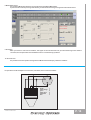
All amplifier modules and the rest of the audio equipment connected to it (mixing consoles, processors, etc.) must be connected to
the AC power distribution in a properway, preserving AC line polarity and connecting earth ground such that all grounding points are
connected to a single node or common point using the same cable gauge as the neutral and line(s) cables. Bad grounding
connections between speakers and the rest of the audio system may produce noise, hum and/or serious damage to the input/output
stages in the system’s electronic equipment.
CAUTION
!
Before applying AC to any K-array self-powered speaker, be
sure that the voltage potential difference between neutral and
earth ground is less than 5 VAC.
3. VOLTAGE REQUIREMENTS
The KH4 or KS4 operates safely and without audio discontinuity if the AC voltage stays within either of two operating windows:
95-125 (voltage selector on 115 V) or 195-250 V (voltage selector on 230 V), at 50 or 60 Hz.
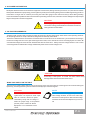
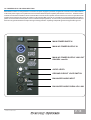
The device is default set to be connected to 230 V AC Power. To use the device on a 115 V AC Power you need, before connecting it,
to move the voltage selector's cover, just loosening the two screws, and to choose the correct use voltage by the red switch. Be
sure that both voltage set on the selector and AC Power have the same value . Always close the voltage selector's cover before
connecting the device to AC Power. Change the label that points out the correct voltage in use.
115-230
CAUTION
!
Connecting a 115V system on a 230V AC Power causes heavy
damages to the device and serious risk for users .
WHEN YOU SWITCH ON THE UNIT:
The main power supply slowly ramps on t he green display on the user panel lights up, and the green leds on the left side lights
up flashing, indicating that the system is enabled and ready to process audio signals
!
CAUTION
NOTE
If the Display does not illuminate or the
It is recommend that the supply be operated in the
system does not respond to audio input
rated voltage windows, at least a few volts away
after ten seconds, remove AC power
from the turn on/off points so that small AC voltage
immediately. Verify that the voltage is
variations do not cause the amplifier to cycle on and
within the proper range. If the problem
off.
persists please contact HP Sound
Equipment or an authorized service
center.
USER'S MANUAL
P. 6