1
3. INTRODUCTION
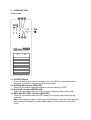
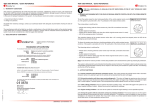
FRONT PANEL
Uninterruptible Power Supply
3.1 ON/TEST Button
Press the button more than 3 seconds to turn the UPS on or press the button
less than 1 second to activate the UPS’s self-testing.
3.2 OVERLOAD indicator (RED LED)
The LED illuminates when the loads are over the capacity of UPS
3.3 BACK-UP indicator (GREEN LED)
The LED illuminates when the UPS is supplying battery power to the loads
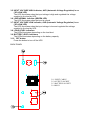
3.4 REPLACE BATTERY indicator (RED LED)
The LED illuminates when the UPS’s battery is no longer useful and must be
replaced.
Note: When battery replace, disconnect the utility power then open the case and
take notice of the battery’s polarity while install the new battery to avoid short
circuit.