1
2. Operator Chooser
On some MiS reports you can choose which operators you want to include / exclude from the report. Picking operators can be
done at any time and saved into a schedule. When picking operators, there are a few extra options to be aware of in addition to
the standard filtering and selection routines.
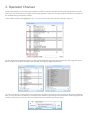
Firstly, deleted operators are highlighted in grey. This is the same for Sales Accounts and Transaction Types too.
You can quickly filter on deleted operators by clicking the deleted label next to the legend, seen below, the image on the left is
before the filter, the image on the right is after the filter. Click again to toggle between them;
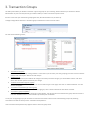
You can also ‘Select All’ or ‘Select None’ in the bottom left. Use these in conjunction with the "Search on Operator Code/Name"
filter. You may also select just deleted or everything except deleted by right clicking on the deleted label. When happy with your
selection, click Confirm to save your choice or Cancel to abort and return to the previous screen.