1
Chapter 3: Setup and Configuration
This chapter describes how to set up and configure the S320 and includes the
following sections:
•
“Control Panel Overview” on page 12
•
“Powering the S320 On and Off” on page 14
•
“Modes of Operation” on page 14
•
“Displaying Current Module Status” on page 15
•
“Changing Module Status” on page 16
•
“Tilt Function Control” on page 17
•
“Alarm/Buzzer” on page 18
•
“Power and Battery Status/Charge” on page 18
•
“Replacing/Swapping the Batteries” on page 19
•
“Removing/Inserting the SD Card / SIM Card” on page 20
•
“Bluetooth Communication” on page 21
•
“Upgrading S320 Firmware” on page 22
•
“GSM Functionality” on page 24
•
“Restoring Factory Defaults” on page 26
Control Panel Overview
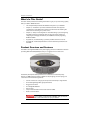
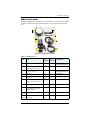
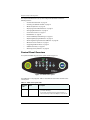
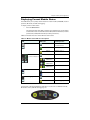
You operate the S320 using the control panel shown in Figure 3-1.
4
1
2
3
5
7
8
6
A
B
Figure 3-1: S320 control panel
The S320 beeps on any keypress. Table 3-1 describes the each button and LED on the
control panel.
Table 3-1: S320 control panel items
Diagram
Item
Name
Description
A
Power button
•
If unit is Off, press and hold until unit powers up (until
you hear one beep)
•
If unit is On, press and hold for approximately 3
seconds (until you hear three beeps) to turn unit off
S320 User Guide
12
PN 875-0281-000 Rev C1