1
PDF Command Line Suite, Version 4.5
Page 3 of 63
November 26, 2015
4.3
5
-M
Set Metadata .......................................................................... 19
-oT
Set Page Mode ........................................................................ 19
-p:
Copy a Specified Range of Pages ............................................... 19
-pl
Set Page Layout ...................................................................... 19
-R
Rotate Pages ........................................................................... 19
-s
Substitute Text Strings in Action Links ....................................... 20
-sp
Substitute a Substring in Action Links ........................................ 20
-uc
Un-embed File Collection .......................................................... 20
-vp
Set Viewer Preferences............................................................. 20
Common Transformations ...................................................................... 21
Page Sizes ........................................................................................ 22
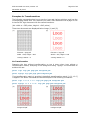
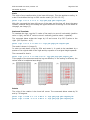
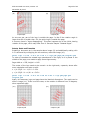
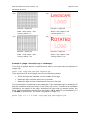
Examples for Transformations ............................................................. 23
pdsplit ................................................................................................. 31
5.1
5.2
6
Description .......................................................................................... 31
Functionality and Options....................................................................... 31
Split Files and name Output Files ......................................................... 31
-b
Extract all or individual Chapters According to Bookmarks ............ 32
-l
Restrict the Processing to a Specific Bookmark Level ....................... 32
-m
Exclude low-level Bookmarks .................................................... 32
-p
Split a Document into Parts with Specified Number of Pages ......... 33
-x
Exchange Bookmark Characters in File Names............................. 33
pdsel .................................................................................................... 34
6.1
6.2
7
Description .......................................................................................... 34
Functionality and Options....................................................................... 34
Select Individual Pages or Ranges of Pages ........................................... 34
-a
Remove Annotations ................................................................ 34
pdw ..................................................................................................... 35
7.1
7.2
8
Description .......................................................................................... 35
Functionality and Options....................................................................... 35
-c
Break down Text Blocks to Individual Character .......................... 35
-cr
Add Carriage Return before New Lines ....................................... 35
-o
List the Annotations in a Separate File........................................ 35
-r
Take Account of the Page Rotation ............................................. 35
-u
List the Text in Unicode Encoding .............................................. 35
-w
Break down Text Blocks to Blank Separated Words ...................... 35
pdform ................................................................................................. 37
8.1
8.2
9
Description .......................................................................................... 37
Functionality and Options....................................................................... 37
Fill in data ........................................................................................ 37
Add a new form field .......................................................................... 37
Delete a field .................................................................................... 37
-l
List all Form Fields ................................................................... 37
pdwebl ................................................................................................. 38
9.1
9.2
Description .......................................................................................... 38
Functionality and Options....................................................................... 38
Add URL Links to a PDF Document ....................................................... 38
Add Page links to a PDF Document....................................................... 38
© PDF Tools AG – Premium PDF Technology