1
2.3.2
On Call function
2.3.2.1 On Call function
On Call settings allow configuring camera‟s response when phone call or SMS command is
received. These settings can be set only by Administrator‟s user class. Phone call or SMS commands are
accepted only from the authorized users' phone number. Authorized users are configured in the Users
management section. Area listening feature may be accessed by all types of user classes: Administrator,
User and Guest.
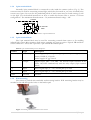
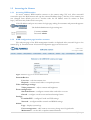
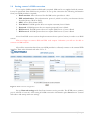
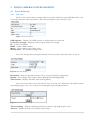
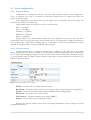
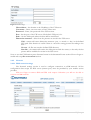
Figure 15. On call event settings.
Enable – Check the box to enable “On call” function.
Send email – Check the box to send snapshot or video clip to authorized user email. Email
address is configured in the Users management section.
Turn voice on – Check the box to activate area listening feature. This feature allows to listen
surrounding are by making a phone call to the camera.
Turn voice on after – threshold of beep (ring) count (1 beep = 5s). To request image or clip
from camera, make a call shorter then defined number of beeps. Make a call longer then defined
number of beeps, to activate “area listening” feature.
Resolution – Select desired resolution of the image or video clip [VGA/QVGA/QQVGA].
Quality – Select video quality. [Basic/Medium/Normal/High/Best].
Single shot – Check the box if only single frame is needed.
Frame rate – Set frame rate for the video stream.
Video format – Select video format [MJPG, MPEG4].
Video duration – video clip duration.
2.3.2.2 SMS commands
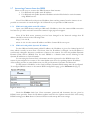
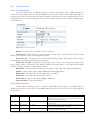
Camera allows reaching some of it features using SMS. The messages are accepted only by
Administrator and User class users. If the SMS sender‟s phone is not in the users list it will be ignored
by the camera.
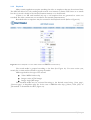
Command
apn, pn
Users class
Administrator
Example
apn operator_apn pn *99#
img
Administrator,
user
Administrator,
user
Administrator,
user
img
img email
alarm on
img email
alarm on
Action
Sets provider APN and phone number. After the camera
receives SMS it changes its settings, sends confirmation
SMS to the senders and reboots.
In order to test camera remotely the SMS may be sent to
generate event.
Camera sends snapshot taken when SMS is received to the
user‟s email from which SMS is received.
Camera enables “On event stream” and sends
confirmation SMS to the sender.
21 | P a g e