1
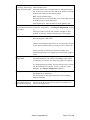
STYLE DARKDETECT
Specifies a histogram mask with HMCENTER 0.15 and HMWIDTH
0.3. This will autogain on the darkest 30% of the image, which
means that the darkest parts of the scene are properly
illuminated.
STYLE FACTORY
Specifies a histogram mask with HMCENTER 0.6 and HMWIDTH
0.6. This is the same as CLIPAVERAGE.
STYLE PEAKDETECT
Specifies a histogram mask with HMCENTER 0.95 and HMWIDTH
0.1. This will autogain on the brightest 10% of the image, so
that the brightest parts of the scene are properly illuminated.
TARGET value
Sets an average brightness for the gain control - the gain will
stay close to this amount, but may fluctuate. Enter a value from 0
(darkest) to 1.0 (brightest), in tenths, which will correspond to
the shade of gray of the gain correction: for example, 0.4 = 40%
gray.
Defaults
AUTO ENABLED
HMCENTER 0.6
HMWIDTH 0.6
PREFERENCE NORMAL
SPEED 120 (can vary based on model)
TARGET 0.6 (can vary based on model)
Examples
SET IMAGE GAIN HMCENTER 0.15
SET IMAGE GAIN HMWIDTH 0.3
(gain on darkest pixels only)
SET IMAGE GAIN HOLD .3
SET IMAGE GAIN PREFERENCE FORCE
SET IMAGE GAIN SPEED 60
See Also
SET/DEFINE IMAGE GAIN WINDOW
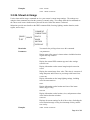
3.2.8. Set/Define Image Gain Window
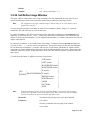
This command is only applicable to the IQeye3xx and IQeye501 cameras. The gain window allows you to
define a rectangular area within your image that will become the gain control, or backlight correction area.
You can select just the region of interest and the gain control will use only that area to calculate the gain
correction. This is useful if some parts of your image are excessively bright or dark. Remember that the
entire image will become brighter or darker as a result.
Page 27 of 190