1
(3) Download Firmware
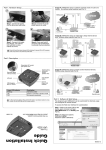
The RMCARD301 offers a simply method to upgrade the firmware. To upgrade firmware, click Download Firmware from RMCARD301 Setup
menu, click “Browser” select new firmware file (*.bin) and press “Start”. The RMCARD301's Red LED and Yellow LED will flash to indicate the
firmware is upgrading. After the upgrade is complete the RMCARD301 will reboot. To upgrade multiple RMCARD301s with the same firmware,
press and hold the Ctrl key and select the RMCARD301s to upgrade.
(To obtain the latest firmware please visit http://www.megatec.com.tw ) If upgrading multiple units, select the option for multiple NetAgent
upgrades.
Note: The RMCARD301 provides a fail safe method to upgrade the firmware.
previous firmware. If the upgrade fails simply repeat the upgrade process.
If the upgrade is interrupted the RMCARD301 will revert to the