1
Contents
1 Introduction
1 2 2.1 Getting Started
Achieving the Best Performance
2 2 3 3.1 3.2 3.3 Overview
About the Power Connect™ Feature
Shielded Twisted Pair (STP)/Unshielded Twisted Pair (UTP)
Defining EDID
3 3 4 4 4 Defining the WP-121
5 5 5.1 5.2 5.3 5.4 5.5 Installing and Connecting the WP-121
Installing the WP-121
Connecting the WP-121
Grounding the Wall Plate
Wiring the CAT 5 LINE IN / LINE OUT RJ-45 Connectors
Wiring the 9-Pin Terminal Block Line Output Connector
7 7 7 8 9 10 6 Capturing the EDID
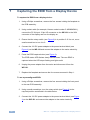
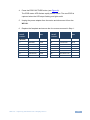
11 7 Capturing the EDID from a Display Device
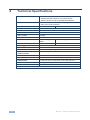
12 8 Technical Specifications
14 Figures
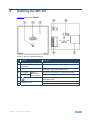
Figure 1: WP-121 US Version (69mm)
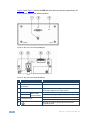
Figure 1: WP-121 Front Panel (80/86mm)
Figure 1: WP-121 Rear Panel (80/86mm)
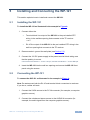
Figure 3: Installing and Connecting the WP-121
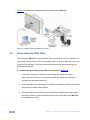
Figure 4: Ground Connection
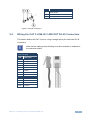
Figure 5: CAT 5 PINOUT
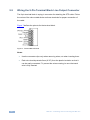
Figure 6: Terminal Block Pinouts
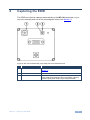
Figure 7: WP-121 PCB Assembly Front View with Face Plate Removed
5 6 6 8 9 9 10 11 WP-121 – Contents
i