1
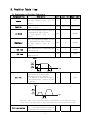
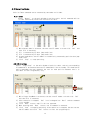
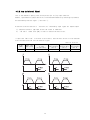
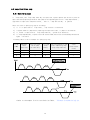
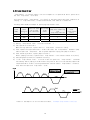
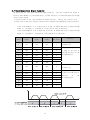
Example) When Position No 0, 1 are specified as under, that is, position 0 is specified as Continuous Action,
Speed
PT No
Cont Act
JPT No
Position 0
1
1
Position 1
0
Time
Position
0
:
Position
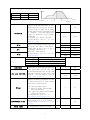
JP Table No.
JPT 0
JPT 1
JPT 2
Loop Count
Loop Jump Table No.
PT set
Loop Counter Clear
Check Inpos
When this item specified, the system
jumps to JP Table No and execute it after
completing action of current position.
If Position No is specified as 10XXX,
system jumps to Position No XXX as soon
as‘JPT Start’, one of the input digital
signal to controller from outside,
becomes ON.
For program exit, specify as blank.
For more details, refer to 「4.4 Input
Condition - Jump」.
If any of these items is checked and
there are corresponding input signals of
JPT input0, JPT input1 or JPT input2,
system jumps to JPT 0, JPT 1 or JPT 2
accordingly regardless of
specified ’Jump Table No.’.
For more details, refer to 「4.4 Input
Condition Jump」.
-
0
10,000
1
:
255
10,255
0
255
10000
10255
0
255
10000
10255
0
255
10000
10255
0
100
0
255
10,000
10,255
0
15
-
0
255
-
0
1
-
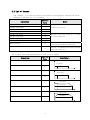
Input signal
Corresponding Input Jump Position
JPT input0
JPT input1
JPT input2
Input Jump Position No 0
Input Jump Position No 1
Input Jump Position No 2
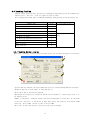
If these item are specified, system
repeats action of the position specified
times (Loop Count) and after then jumps
to corresponding position to Loop Jump
Table No regardless of specified ’Jump
Table No’. For more details, refer to
「4.5.1 Loop Setting」.
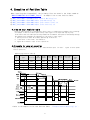
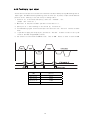
Specifies output signals such as PT
Output0, PT Output1, PT Output2 in order
to confirm the start or stop of motor
operation for each position.
0,8: Not use output signal
1~7:Specifies output function when
starting operation
9~15: Specifies output function when
completing operation
For more details, refer to 「4.6
Start/Completion Alarm Function」.
If this item is checked, Loop Count of
specified no of PT is to be cleared.
For more details, refer to 「4.5.1 Loop
Setting」.
If this item is checked, stop condition
is recognized by Inposition finish.
7
-