1
SMART User Authentication
CiscoSecure
Cell-ID Authentication
Server
UNIX Server
Telnet, FTP, rsh,
rlogin, X Windows
NAS
(Network Access Server)
Corporate LAN/WAN
Internet
Firewall
Remote dial-up user
Cell-ID
Applications
Web server
FTP server
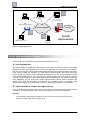
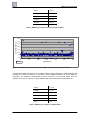
Figure 1: Cell-ID applications
Cell-ID Authentication Process
The following two steps embody the Cell-ID Authentication Process:
A. User Registration
The user’s details, including (but not limited to) a username or number and his or her mobile
telephone number are registered in the Cell-ID user database. For employees of a company,
this can be done by the Cell-ID system administrator and does not need confirmation from thirdparty sources outside the company. For online Internet services where users from among the
general public can register online, the details submitted by the user to the database must be
confirmed by another source. This can be done by asking the user to fax and/or post information
such as mobile telephone account statements, credit card statements, etc, and/or by querying
other databases such as those from mobile communication network service providers and
banks. Every time the information is confirmed, the confidence level, a numerical value
reflecting the integrity of the confirmation method, is adjusted and updated in the database.
B. Authentication procedure per login session
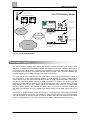
The procedure that is performed each time a user logs into a Cell-ID protected system is shown
in Figure 2. The following terms will be used in the explanation of Figure 2 that follows:
IP Server
The computer system which provides a secure service over an IP (Internet Protocol)
network to which users want to gain access.
Page 8