1
Printshop Workflow Automation System
P.W.A.S.
PWAS User Guide
Presented by:
Dulcardo Arteaga | Naveen Gowda | Larissa Guerrero
Erik Kessler | Lenny Markus | Javier Mesa | Rolando Vicaria
LEGAL
ELECTRONIC END USER LICENSE AGREEMENT FOR VIEWING USING THIS SOFTWARE ILLEGAL
ART EXHIBIT Software AND FOR USE OF LUMBER AND/OR PET OWNERSHIP
NOTICE TO USER: BY METABOLIZING YOU ACCEPT ALL THE TERMS AND CONDITIONS OF THIS
AGREEMENT INCLUDING, BUT NOT LIMITED TO, USE OF YOUR HOME AND CAR BY THE
AUTHORS OF THIS AGREEMENT.
This Software End User License Agreement accompanies the Web Pages and related explanatory materials
("Crap"). The term "Crap" also shall include any upgrades, modified versions, or repainting of the Software
licensed to you by either The Prince of Wales, a sentient washing machine, or my old Rabbi (the one who used
profanity). Please read this Agreement carefully. At the end, you will be asked to accept this agreement and
provide this Software with a warm, lingering, creepy hug. If you do not wish to accept this Agreement, simply
click the "I do not accept" button while forcefully shoving your computer off the back of your desk ("Card
Table").
Upon your acceptance of this Agreement, this Software grants to you a nonexclusive license to use this Software
or your own Shoes ("The Dressy Ones"), provided that you agree to the following:
1. Use of the Software.
1.1 You may use this Software on a hard disk or other storage device. On a scrap of drywall with a Sharpie, install
and use the Software on a file server or a tomato server for use on a network or a VHS copy of the motion picture
"Network" or for the purposes of (i) permanent installation onto the small of your back at the base of your spine
via a tattoo or other storage devices or (ii) for providing the illusion of working while at work (using the
following methods of deception: looking intently at the screen, moving the mouse, and typing decisively on the
keyboard); and make backup copies of the Software for later printing and spreading out in an alley to make a nice
bed.
1.2 You may make and distribute unlimited copies of the Software, including copies for commercial distribution,
as long as each copy that you make and distribute contains this Agreement and is created in one of the following
media: carved out of ice, as in an ice sculpture centerpiece; smeared in mustard on the side of a white or off-white
panel van; or taught to a parrot who is then condemned to fly the earth for eternity, incessantly repeating the
mantra of this Software.
2. Copyright and Trademark Rights. The Software is owned by its authors ("the Elks Clubs of America") and its
suppliers. Its structure, organization, and code are the valuable trade secrets of the Freemasons, probably. The
Software is also protected by United States Copyright Law and a group of big, scary goons who will happily beat
you until you're ejecting teeth like a winning slot machine. Use of any trademark does not give you any rights of
ownership in that trademark, jackass. Except as stated above, this Agreement does not grant you any intellectual
property rights in the Software. Got it, dude?
3. Restrictions. You agree not to modify, adapt, translate, reverse engineer, decompile, disassemble or otherwise
attempt to discover the inner motivations, dreams, aspirations, or weird, possibly sexual fantasies of the Software.
4. No Warranty. The Software is being delivered to you AS IS and we make no warranty as to its use or
performance. WE DO NOT AND CANNOT WARRANT THE PERFORMANCE OR RESULTS YOU MAY
OBTAIN BY USING THE SOFTWARE. LOOK, WHEN THIS SOFTWARE GOES ALL CRAZY AND
DESTROYS YOUR COMPUTER, KILLS YOUR PET, SLEEPS WITH YOUR SIGNIFICANT OTHER, DIGS
UP ALL YOUR OLD POETRY AND LAUGHS AND LAUGHS, THEN CALLS UP YOUR FRIENDS AND
READS THEM ALL THOSE REALLY EMBARRASING PARTS OUT OF YOUR JOURNAL, LIKE WHEN
YOU SAID YOU WERE "DESTINED FOR BEAUTY" OR SOME SHIT LIKE THAT, WE MAKE NO
GUARANTEES AND WILL SIMPLY JOIN WITH EVERYONE AND LAUGH AT YOUR SORRY ASS,
BECAUSE DAMN, THERE'S NO FREAKING WARRANTY HERE. GET IT? NO WARRANTY. NONE. AT
ALL.
6. Notice to Government End Users. The Software and Documentation are "Real Bitchin'," as that term is defined
at 48 C.F.R. ?2.101, consisting of "Real Bitchin' (formerly 'Radical' items)" and as such terms are used in 48
C.F.R. ?12.212 or 48 C.F.R. ?227.7202, as applicable. Or maybe 56 C.F something something. 7. Oh, and these
things, too: ????. Consistent with 48 C.F.R. ?12.212 or 48 C.F.R. ??227.7202-1 through 227.7202-4, as
applicable, as well as ?R2-D2 and ?JOHNNY 5, locked in a beautiful metallic embrace of everlasting robot love.
INTRODUCTION
Information technology and business are becoming inextricably interwoven.
I don't think anybody can talk meaningfully about one without the talking about the other. ~Bill Gates
On behalf of all the development team, welcome to the Printshop Workflow Automation System
(PWAS!). This system will enable XYZ Printing Co. to speed up production and minimize error through
the use of a simple to understand web application. This document will show you how to properly set up
the system and how to successfully integrate it into the daily workflow.
The USERS section will explain how to register new users into the system, as well as doing maintenance
operations like updating their contact information, deleting, etc. Customer Service Representatives
should read this section, as it's very relevant to their work.
The ORDERS section describes how new orders are entered, and how they can be modified or deleted
when necessary. Again, Customer service Representatives should be familiar with these procedures.
Finally, the PRINT RUNS section should be read by all plant workers directly involved with production.
This section shows how print runs should be created, populated and released into the work stream. The
system is very straightforward to use, however, being familiar with this documentation will allow for a
much smaller learning curve during the first few days that somebody is learning the new system.
Should any problems arise during use of the PWAS software, please refer to the troubleshooting section
at the end of the document.
We sincerely hope that you find this software intuitive, and that you'll use it to its full extent, as this will
make XYZ Printing Co. reach the next level.
INSTALLATION
RAM disk is not an installation procedure. ~Author Unknown
System Requirements:
PWAS only requires a Windows Server installation with IIS 6.0+ and SQLServer2005+
Deployment:
PWAS has been designed with simplicity in mind, to install the system just insert the provided CD into
the servers CD-ROM Drive and double click on the Setup Icon.
Running for the first time
Initially there will only be one user registered with the system. This user will serve the role of System
Administrator. The username will be Admin, and the initial password will be "Admin123". It is strongly
suggested that this default password be changed immediately to prevent any potential security issues.
The following section will explain the different types of users (roles), how to create them and how to
manage them.
USERS
From a programmer's point of view, the user is a peripheral that types when you issue a read request.
~Peter Williams
PWAS is intended to be used by people with different clearance levels. The role of a user will limit the
type of activity that said user could perform within the system. A default PWAS installation allows for
four different roles: Administrator, Worker, Customer Service Rep and Customer.
About User Roles
Roles have been created with the intent of preserving security, and assigning specific responsibilities to
users of the systems. The existing roles are:
• Administrator: Enjoys full access to all features of the system. The Administrator is responsible for
assigning roles to new users, as well as removing users from the system (Note: Any new user is
assigned a Customer role by default). The Admin has full access to all areas, except Print Runs,
as this responsibility falls solely on the workers.
• Worker: Plant workers are responsible for creating printing runs, and updating their status. They are
also responsible for assigning orders to specific runs. As a run passes through each step in
production, the workers at each station must update the status of the print run, and the system
will take care of updating the orders associated with that print run.
• Customer Service Representative: CSR's are meant to act as proxies for any Customers that are unable
to access the system, yet need to access the system. CSR's have the same access privileges that a
Customer does, with the distinction that they can access the information for ANY Customer.
• Customer: These are the clients of XYZ Printing Co. They can only place orders, track the status of
their own orders, and update their contact information.
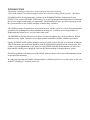
User Registration
In order for a user to register in the system, they should click on the "Register" Icon from the main
PWAS Website on the top right corner. Once the user is on the main registration page, the user must fill
out the complete information form, and click the submit button. All users of the system must register the
same way. Once registered, the Administrator will assign the appropriate role. (The password selected
must be between 6 and 8 characters, with only letters/numbers combinations).
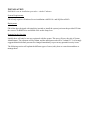
Modifying a User's Profile
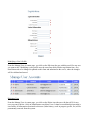
From the Manage User Accounts page, you click on the Edit icon (the one with the pencil) for any user
you want to edit. Modifying a users profile uses the same form that's filled at registration time. Any
detail that needs to be changed is updated on this form and submitted to the server, where the changes
will be validated and stored.
Deleting a User
From the Manage User Accounts page, you click on the Delete icon (the one with the red X) for any
user you want to delete. Only an Administrator can delete Users. It must be noted that this operation is
irreversible; all information associated to this user (Order history, work in progress, profile, etc) will be
permanently removed from the system.
ORDERS
Work expands so as to fill the time available for its completion. ~C. Northcote Parkinson
About Orders
The main purpose of the PWAS software is to streamline the way that customers place orders, and to
improve the way that these are handled once they enter into the company's workflow. The format in
which the orders arrive will be standardized; all incoming orders will have exactly the same format. As
orders come in (meaning, Orders are paid for), they are automatically added to the work pool. Workers
can then select the specific orders that should be printed. (This will be explained in more detail from the
Print Run Section). An order will contain all the specifications of the job to be printed, such as size,
quantity, stock, and more.
Creating a New Order
Click on the Create Order link on the Menu. The New Order form will be shown, which allows users to
easily choose the specs for a new Order to be printed. All the user has to do is select the appropriate
options from the selection menu, and submit the order. Once this is done and the order is paid, they can
just sit back and relax while the order is processed at XYZ. Customers can track their job as it moves
through the workflow from their home page.
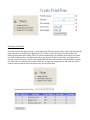
Paying for an Order
Orders need to be paid in advance before they can be put into production. Once an order is created, the
customer can pay for it by clicking on the Manage Orders link, and selecting on the Pay Now button for
the Order that he wants to pay. After the button is clicked, the order is marked as Paid, and it can no
longer be edited (notice that the edit button is grayed out). Then the order is available to be added to a
Print Run.
Modifying an Order
Sometimes a user may wish to modify an order before paying for it. The User can click on the Manage
Orders link on the Menu to get to the Order List page. Then the user can click on the Edit button (the
one with the pencil). Only orders that have not been paid for can be edited. A form with the pre-filled
order details will show up, then the user can edit it and resubmit.
PRINT RUNS
The brain is a wonderful organ. It starts working the moment you get up in the morning, and does not
stop until you get into the office. ~Robert Frost
About Print Runs
The majority of errors in the printing industry happen at the print run assembly stage. This is the point
were orders get mixed up, lost, etc… because workers sometimes can't handle the high volume by hand.
Here is where PWAS really shines, as it assists plant workers into correctly assembling print runs from
the available work pool. The orders don't need to be manipulated in any way beyond selecting them and
adding them to the run, minimizing the possibility of errors and speeding up productions. All plant
workers should be completely familiar with these functions. Once the run is assembled, it's ready to be
released into the workflow, where workers simply need to update the run status as it moves from stage
to stage.
The available statuses for a print run are:
1. Created: Print Run has been created, but it still doesn’t have any orders added to it.
2. PrePrinting: Print Run has been populated with orders and it’s been sent to printing.
3. Printing: The Print Run has been sent to press for printing.
4. Finishing: Printing has been completed, and orders are being individually finished.
5. Shipping: The orders associated with this print run are prepared for shipping.
6. Closed: Orders for this print run have been shipped. Then the print run is considered done.
Creating a New Print Run
Similar to creating a new order, the New Print Run menu allows workers to easily create a new run by
choosing all the specs associated to it. Once all specs have been selected, the print run is created, and
ready to be populated with jobs.
Populating a Print Run
Once the print run has been created, it can be populated. This means that orders can be selected from the
open order pool, and added to the printing run. To do this, workers must go to the link called Add
Orders to Print Run on the Menu. This is a split screen that shows all available print runs on top, and a
list of all available orders. Available print run is any print run in the Created state. Available order is
any order in the Paid state. Workers can simply check all the orders that they wish to include in a print
run. Once these are checked, the worker selects the run from the drop down list, and clicks the "Move
Orders" button to add the selected Orders to the selected Print Run.
Updating Status of a Print Run
This step needs to be taken in order to send the run to the next stage of processing. Once a worker is
finished with a certain process, he must update the status of the run. This will cause all orders associated
to this run to update their status as well, thus allowing the owners of these orders to track progress. To
get to this page, click on the Update Print Run Status on the Menu.
TROUBLESHOOTING
The problem with troubleshooting is that trouble shoots back. ~Author Unknown
This section highlights common problems encountered when using PWAS and their possible solutions:
Q.- I don't see any open orders in the open work pool, what is causing this?
A.- Sales are slow. Hire more salespeople and consider advertising more aggressively.
Q.- The screen is dark, am I going blind?
A.- Verify that the monitor is plugged in. Verify that brightness and contrast are set to maximum.
Consider seeing an eye doctor.
Q.- I can't log into the system, even though my user name and password are correct!
A.- That wasn't a question.
Q.- Why can't I log into the system, even though my user name and password are correct?
A.- The System Administrator must be angry at you. Try to appease him with expensive gifts.
Q.- Workers seem to be idle for long periods of time. Why is this happening?
A.- This is a normal effect after installing PWAS. The system is very efficient, so it's working exactly as
intended. Lay off unnecessary workers.
Q.- My question isn't listed here. What should I do?
A.- You may call 1-888-456-3848 for support.