1
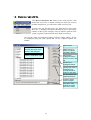
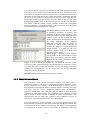
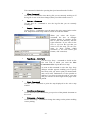
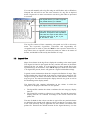
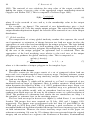
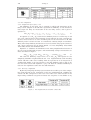
The Palette editor is closely associated with the Legend editor. The latter
enables to define the way in which data are presented on a map.
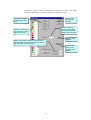
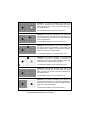
Accept or decline the last
changes
4 buttons for palette
file handling (.SMP
files)
Set the number of
colours in the palette.
The maximum is 256.
Default colour is black
Click in a colour box,
to access the colour
editor for that box.
Blend colours that smoothly evolve from the
one indicated with the lower index, till the one,
indicated with the upper index.
Apply current
settings
Reverse the
order of the
colours in the
palette
21