1
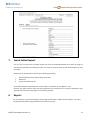
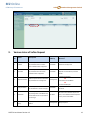
SEZ Online Of Ministry of Commerce 7. NSDL Database Management Limited Search Softex Request The unit users can search for any Softex request that they have prepared/submitted to DC office by using the search facility provided in the SEZ Online system. The users can track the status of their Softex Request by using this facility. The Request can be searched on the basis of the following parameters i. ii. iii. Date of submission of the Softex request to DC office Request ID Status of the Softex request All the Softex Requests submitted by the unit are visible to ‘Unit Maker’ & ‘Unit Approver’ users. However, only those requests which have been prepared by Unit maker but has not yet been submitted to Unit Approver cannot be searched through the search facility provided. 8. Reports The Unit Approver may view the following report through the link Report Softex Summary Report. The report may be generated for date range (submission date of Gist of Contract). SOFTEX User Manual Version 1.2 12